Lesson 2.1.4
Build your own research step in plain English
What this costs
Charged on run at the price on the tool card, so a row costs the same whether it finds an answer or not. Preview on five rows before creating the column.
Before you start
A table with websites filled, and a question the standard tools do not answer.
The standard tools answer standard questions. The custom research tool answers yours. This is where Kuration stops being a data vendor and becomes a research platform, and it is also the tool most people write badly on their first three attempts.
Four parts, and all four matter
| Part | What it decides | The mistake |
|---|---|---|
| Objective | What you are trying to learn about this row | Writing a topic instead of a question |
| Outcome | What a good answer looks like | Leaving it open, so every row answers differently |
| Format | The exact shape of the value returned | Free text, which cannot be filtered or scored |
| Sources | Where the tool should look | Not saying, so it reads whatever it lands on |
- 1
Write the question as a question
Not "hiring activity" but "is this company currently hiring for a revenue or sales operations role".
- 2
State what counts as yes
The tool has to make a judgement call on ambiguous rows, and if you have not told it where the line is, it will put it somewhere different on every row.
- 3
Force a fixed output format
One of a small set of values, or a number, or a date. Add a value for cannot tell. Never leave the format open.
- 4
Name the sources it should prefer
The company careers page, the main site, a specific kind of listing. Naming sources cuts noise and makes the answer auditable.
- 5
Preview on five rows and read the reasoning
You are checking whether the tool interpreted the boundary the same way you did. If two of the five are judgement calls you disagree with, tighten the outcome and preview again before creating the column.

Preview before you create. Five rows is enough to catch a boundary you defined loosely.
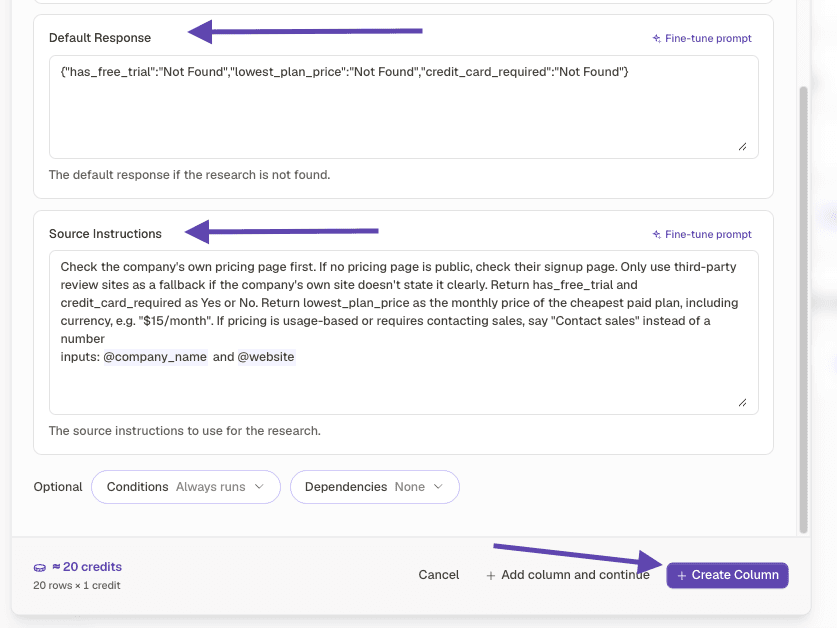
A prompt that works, written out in full
OBJECTIVE
Determine whether this company is currently hiring for a revenue operations, sales operations or growth operations role.

WHAT COUNTS AS YES
An open role, posted or updated in the last 90 days, whose responsibilities include owning the sales or revenue tooling stack, pipeline reporting, or go to market systems. The title does not have to contain the word operations. A generalist operations role at a company under 30 people counts if the description mentions CRM or pipeline ownership.

WHAT COUNTS AS NO
Roles that are purely finance operations, purely people operations, or purely customer support. Agency and recruiter postings on behalf of an unnamed client.

OUTPUT FORMAT
Return exactly one of: YES, NO, UNCLEAR.
Then a second field with the role title if YES, or an empty string.
Then a third field with the URL you based the answer on.

SOURCES
Prefer the company careers page on their own domain. Then major job boards. Do not use aggregator pages that republish listings without a date.
Notice there are three fields, not one. The verdict is what you filter and score on. The title is what you write the first line with. The URL is what makes the claim defensible when someone asks where it came from.
Worked example · What the column returned on five preview rows
| Company | Verdict | Role found | Source |
|---|---|---|---|
| Northwind HR | YES | Revenue Operations Manager | careers page |
| Remote.ly | YES | Head of GTM Systems | careers page |
| PeopleStack | NO | careers page, 2 roles, both support | |
| Coastline Studios | UNCLEAR | no careers page found | |
| Vantage Renewables | NO | careers page, no open roles |
No output format specified
- What you see
- Every row returns a differently shaped paragraph
- The fix
- Force a fixed value set. You cannot filter or score free text.
No cannot tell option
- What you see
- Confident answers on rows with no available evidence
- The fix
- Add UNCLEAR and require a source. Rows with no source are rows to re run or cut.
Objective is a topic, not a question
- What you see
- Vague answers that are all technically correct
- The fix
- Rewrite as something with a yes and a no.
Created the column straight onto 800 rows
- What you see
- A large spend on a prompt that needed two more edits
- The fix
- Preview on five. Always.
Check yourself
0 of 3 answered1.Which part of a custom research prompt do people most often skip?
2.Why include an option like UNCLEAR?
3.How many rows should you preview on before creating the column?
Try it yourself
Write one custom research column for the qualifying question you currently answer by hand. Force a three value output plus a source field. Preview on five rows.
- You have done it when
- All five preview rows return one of your three values, with a source, and you agree with all five verdicts.
- Credit budget
- Five preview rows.
Related and next
Recipes that use this skill