Lesson 2.1.6
Not Found, Skipped, Error or blank: read the cell before you run it again
What this costs
Free. This lesson is about reading what a column already did.
Before you start
A tool column where some rows did not come back with a value.
When a tool runs on a row it always leaves something in the cell: a value, Not Found, Skipped with its reason, or Error. A cell with nothing in it at all means the tool has not run on that row, and the usual reason is that the column was run while a filter was on. A blank is never an answer. If a filter does not explain it, flag it.
What each cell is telling you
| The cell shows | What happened | What to do |
|---|---|---|
| Not Found | The tool ran on the row and found nothing | Accept it, or change the input or the tool. Running the same tool on the same input again is unlikely to change the answer |
| Skipped, with its reason | The tool did not run. A condition excluded the row, or the column it depends on had no usable value | Fill the missing input or loosen the condition, then run those rows |
| Error | The tool ran and failed on this row | Re run the error cells on their own |
| Nothing at all | The tool has not run on this row. Usually the column was run while a filter was on, so only the rows in view ran | Clear the filter and run the column. If no filter explains it, flag it to support |
Running a column again is safe by default
A normal run only fills empty cells. Cells that already hold something, Not Found included, are left alone, so clearing a filter and running the column again only spends credits on the rows that never ran. Re running errors, Not Found or every cell is a deliberate choice under Advanced Options on the column's Run menu, and each cell you re run is charged again the way the tool card says.

- 1Thirty six percent, in green, red and amber. Completion, rejections and skips, in one bar.
- 2Skipped. The tool never ran here, so nothing was charged and nothing was missed.
- 3The reason: this row is B2C, and the condition asked for B2B.
Count them before you touch anything
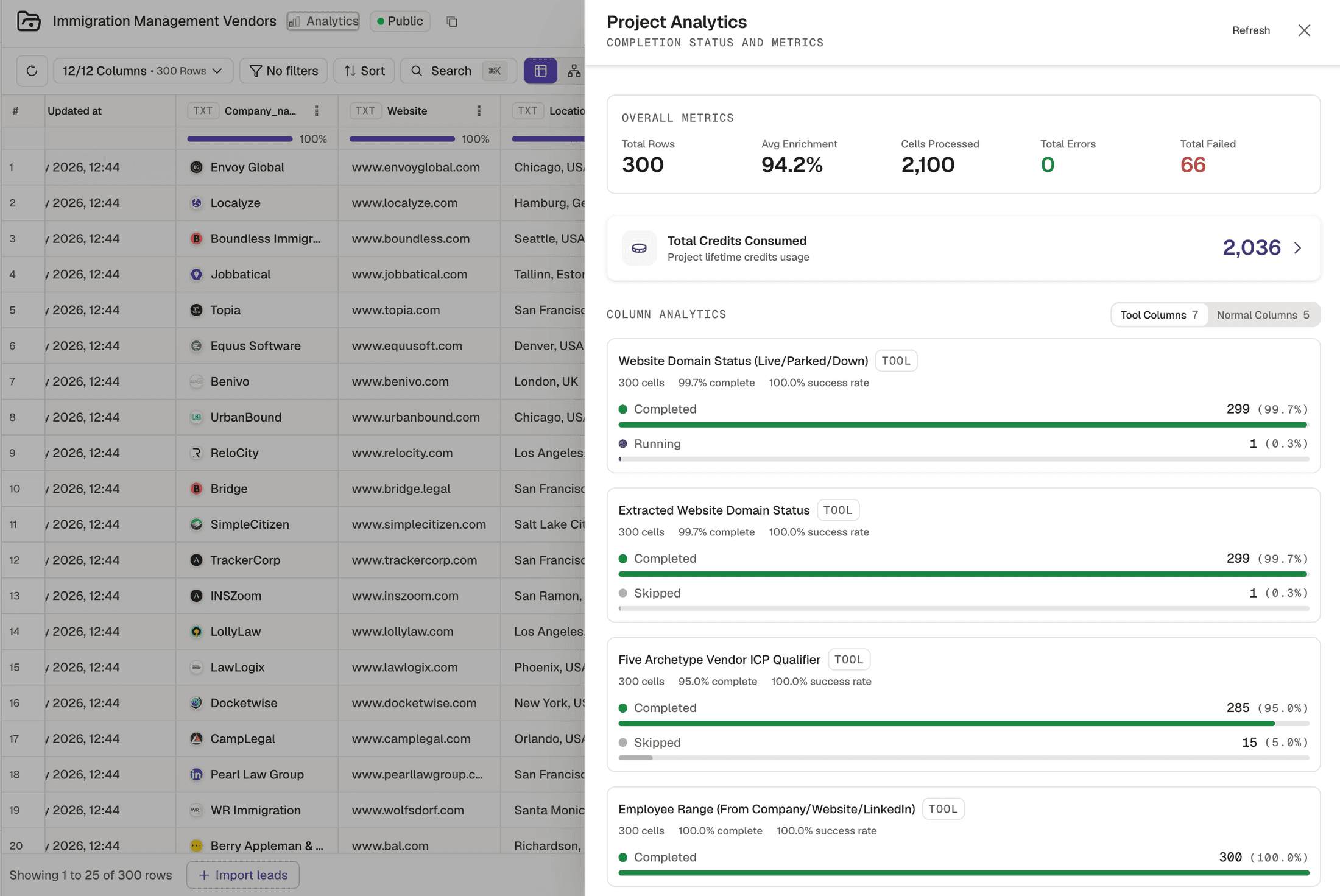
- 1Completed. The tool ran and returned a value. 299 of 300.
- 2Running. Still working. A column that depends on this one waits for it, which is lesson 2.1.7.
- 3Skipped. The tool never ran on these 15 rows, so they cost nothing. Fix the input or the condition, then run them.
- 4Total Failed: the tool ran and errored. Those are the cells worth re running on their own.
- 1
Read the skip reasons
A Skipped cell says why. A condition that excluded the row is working as you set it. A missing input, most often the website, is fixed in the column this one depends on, not in this one.
- 2
Check whether a filter was on when the column ran
If the blank rows are the ones outside that filter, clear it and run the column. Only the empty cells run.
- 3
Re run errors on their own
Use the option to re run rows with errors under Advanced Options, rather than running the whole column again.
- 4
Flag the blanks nothing explains
No filter, no condition, no error, and still nothing in the cell. Send the project and the column to support rather than running it again and hoping.
Ran a column with a filter on and forgot
- What you see
- The rows outside the filter sit blank
- The fix
- Clear the filter and run the column again. Only the empty cells run, so nothing is charged twice.
Read Skipped as poor coverage
- What you see
- A support ticket about data quality
- The fix
- Read the skip reason first. If the rows are missing a website, fill it with Website Finder and run them again.
Kept re running to fix a Not Found
- What you see
- The same Not Found every time
- The fix
- Not Found is the tool's answer for that input. Change the input or the tool, not the number of attempts.
A blank nothing explains
- What you see
- No filter, no condition, no error, and an empty cell
- The fix
- Flag it to support with the project and the column. It is a cell that should have run.
Check yourself
0 of 3 answered1.A cell in a tool column has nothing in it at all. What does that mean?
2.You clear the filter and run the column again. Which cells run?
3.Where can you see completed, running, skipped and failed cells counted per column?
Try it yourself
Take your worst performing column. Open Project Analytics, then sort every cell without a value into Not Found, Skipped, Error and blank.
- You have done it when
- Every blank is explained by a filter you ran under, or has been flagged.
- Credit budget
- Free.