Lesson 2.1.2
Conditions: run a column only on rows that qualify
What this costs
Free to set. Conditions are the thing that makes everything else cheap.
Before you start
A table with at least two columns filled, one of which could gate the other.
A filter decides what you look at. A condition decides what a column runs on, and it stays attached to the column. That difference matters the moment a list refreshes or grows, because a filter is something you remember to apply and a condition is something the workflow enforces.
Filter versus condition
| Filter | Condition | |
|---|---|---|
| What it does | Hides rows from your view | Stops a column running on a row |
| Lives on | The table, temporarily | The column, permanently |
| Survives a new run | No, you reapply it | Yes |
| Survives new rows arriving | No | Yes, new rows are gated the same way |
| Costs | Nothing | Nothing |
Use both. Filter while you are working, and set a condition on any column you expect to run more than once.
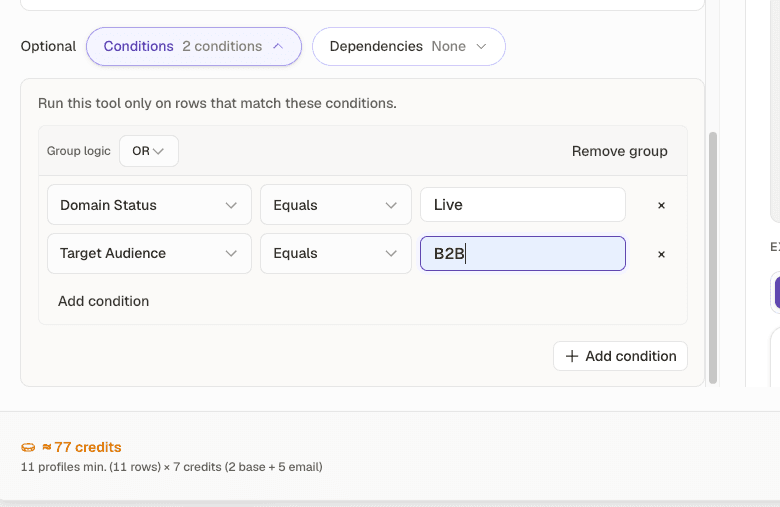
- 1Conditions, next to Dependencies. Both travel with the column rather than with your view.
- 2Run this tool only on rows that match these conditions. Two rules here, combined with OR.
- 3The estimate. Watch this number fall as you tighten the rules.
- 1
Decide the gate before you build the column
Write it as a sentence: only run this if the row has a website and the score is 70 or above. If you cannot write that sentence, you do not yet know what the column is for.
- 2
Set the condition when you configure the column
Conditions are part of the column configuration, not a separate step afterwards. Set them at creation so the very first run is already gated.
- 3
Preview and read the row count
The preview tells you how many rows will actually run. If that number equals your full table, the condition is not doing anything and you are about to overpay.
- 4
Chain conditions down the stack
Each expensive column gates on the output of the cheaper one before it. Website exists, then qualifier passed, then score above threshold, then people search. Cost falls at every link.
Worked example · A gated stack on 1,000 sourced rows
| Column | Condition | Rows it runs on | Unit cost | Spend |
|---|---|---|---|---|
| Website Finder | website is empty | 520 | 1 | 520 |
| Qualifier: sells B2B | website is not empty | 870 | cheap | small |
| Scoring Agent | qualifier passed | 410 | 0 | 0 |
| Find People Agent | score 70 or above | 148 | 3 per result | about 470 |
The people search, the most expensive thing in the stack, ran on 148 rows out of 1,000. Nothing was lost: the 852 rows it did not run on were rows you were never going to contact.
Set a filter and assumed it persisted
- What you see
- A re run processes the whole table
- The fix
- Filters are a view. Put the rule on the column as a condition if it must survive.
Condition so tight nothing runs
- What you see
- Column created, zero rows processed
- The fix
- Read the preview row count before creating. Zero in the preview means zero in the run.
Check yourself
0 of 2 answered1.What is the difference between a filter and a condition?
2.You preview a gated column and the row count equals your whole table. What does that mean?
Try it yourself
Rebuild one expensive column you already have so that it gates on a cheap column plus a score. Compare the preview row count before and after.
- You have done it when
- The gated column runs on under a third of the rows the ungated one would have.
- Credit budget
- Free to configure. Run it on a 100 row sample.