Build the list. Then start the conversation.
Engagement brings outreach into Kuration. Send cold email from your own mailbox, message on LinkedIn and Sales Navigator, reply on WhatsApp, and handle every response in one inbox — next to the data that made the list worth sending.


Available now · anyone can try
The inbox
Four channels, one queue
A prospect who replies on LinkedIn and then emails you is still one conversation, on one contact, in one thread.
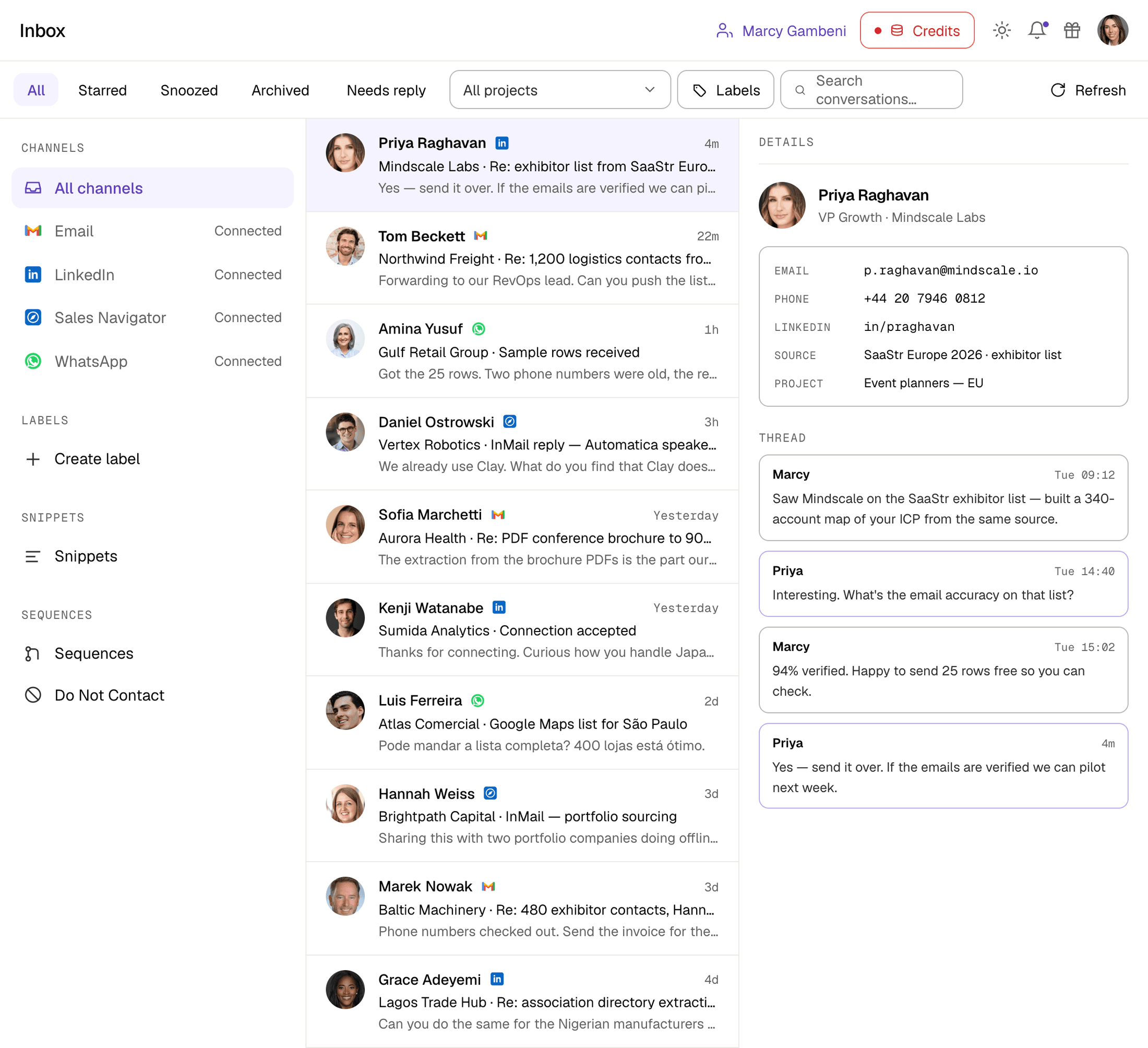
Channels
Reach people where they actually reply
Sent from your own accounts. No shared sending pool, no borrowed domains.
Cold email
Send from your own Gmail or Outlook mailbox, so replies land where your team already works. Connect several mailboxes and rotate sending across them.
- Gmail and Google Workspace
- Outlook and Microsoft 365
- Multiple mailboxes per workspace
Connection requests and direct messages from your own account, sent on a human schedule rather than in a burst.
- Connection requests with a note
- Direct messages and follow-ups
- Daily limits that respect the platform
Sales Navigator
Reach people you are not connected to. InMail replies arrive in the same thread as everything else that prospect has sent you.
- InMail to non-connections
- Works from a Kuration list
- Seat-aware sending limits
For markets where business happens on WhatsApp rather than email. Threads arrive in the same inbox as every other channel.
- Business number support
- Media and document replies
- Same inbox as email and LinkedIn
Triage
Know what is waiting on you
Replies are the point. The inbox is built around getting through them, not admiring them.
Needs reply
The default queue: conversations waiting on you, so nobody sits unanswered for three days.
Starred
Flag the handful of threads that matter this week and come back to them without scrolling.
Snoozed
Somebody said "ping me Monday". Snooze the thread and it returns to the top on Monday.
Archived
Close a conversation out without deleting it. It stays searchable and stays on the contact.
Working the inbox
The parts you use every day
Labels
Create labels that match how your team actually works — interested, follow up, wrong contact, not now — and filter the whole inbox by them.
Snippets
Save the answers you type constantly. Drop a snippet into a reply in one keystroke instead of rewriting it for the hundredth time.
Do Not Contact
One list that every channel and every sequence respects. Add a person or a whole domain and they drop out of everything.
Search across conversations
Find the thread where somebody mentioned budget, or every conversation tied to one project, without leaving the inbox.
Filter by project
Work one campaign at a time. Scope the inbox to a single Kuration project and everything else disappears.
Sequences
One sequence, every channel
Enrol a Kuration project, then branch across LinkedIn, email and WhatsApp based on what each lead actually does.
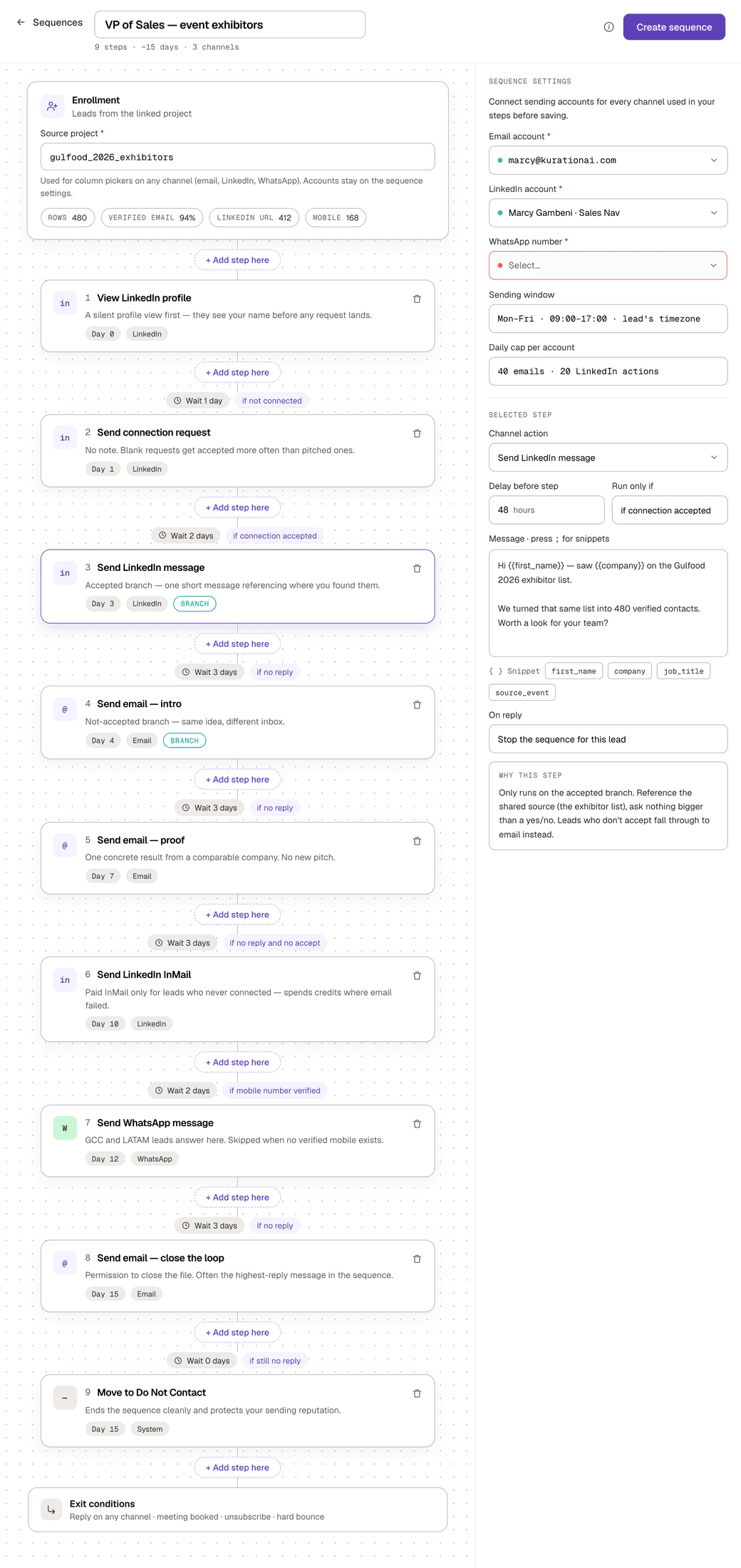
Enrol a whole project
Point the sequence at a Kuration project. Column mappings are guessed from the column names, and a dry run shows how many leads will send and why the rest are skipped: no email, no LinkedIn URL, no phone, already enrolled, or on Do Not Contact.
Start from a template
Three starters open with the steps and waits filled in: LinkedIn warm with email fallback, Engage then connect, and a 3-step cold email. Or describe the sequence in Build with Alex and Alex drafts it for the project you are in.
Warm up on LinkedIn first
Visit profile, Like latest post and Comment on latest post can go ahead of the connection request, so your name is familiar when the invite arrives. Then LinkedIn messages, InMail, email and WhatsApp.
Branch on behaviour
Accepted the connection? Send a LinkedIn message. Not accepted within the wait you set? Fall back to InMail or email. Branch steps run only when a step routes a lead to them.
Waits between steps
Set the gap in days or hours. The timeline shows the day each step lands, so you can see the whole cadence rather than guess at it.
Send in each lead’s local time
Switch on a sending schedule and Kuration reads each lead’s time zone from a Timezone or Location column, or you fix one zone for everyone. Pick the days, the hours and a minimum gap between sends per account.
Merge tags and spintax
Drop first name, company or any project column, like job title or the event you found them at, into the copy. Write {Hi|Hey|Hello} and each lead gets one version, always the same one, or let AI spin suggest alternatives at Light, Balanced or Heavy.
Stops on reply
A reply or a bounce stops the lead by default, or you can route it to another step. Unsubscribe replies add the lead to Do Not Contact, out-of-office replies pause it until the return date, and auto-replies do not stop it.
Performance, lead by lead
The Performance tab has stat tiles and a step funnel, a leads table with status filters, and a per-lead timeline with Open in Inbox links and pause, resume or remove.
Guardrails
Sending schedule
Optional and off by default. Without one, steps send any time
Daily caps
Per account and per action, on email, LinkedIn and WhatsApp
Channel accounts
Each channel sends from an account you connect
Checked at enrolment
Leads missing the contact a step needs, or on Do Not Contact, are skipped
Context
The reply arrives with the research attached
This is the part a standalone sending tool cannot do. Every conversation is still joined to the record that produced it, so when somebody answers you can see the verified email you used, the phone number enrichment found, the source the lead came from, and the project it belongs to.
No tab-switching to remember why this person was on the list in the first place.
See where the data comes fromOn every conversation
- Verified work address, as sent
- Phone
- Direct line where enrichment found one
- Profile behind the conversation
- Source
- Where the lead came from, e.g. an exhibitor list
- Project
- The Kuration list that produced them

Want the inbox summarised for you?
AlexAI Agents can run on a cadence and digest what changed across your replies. Chats, automations and memories live on the AlexAI page.
Engagement is live
Open the app, connect a mailbox or LinkedIn, and start the conversation from the list you just built. No waitlist.
Get started

Describe your target. Get your list.
“Data Edge as a Service is coming.”
Aurelien · CEO & Co-founder · Kuration
Use the platform, call the API, or wire it into your agents via MCP. Any market. Any language. Any source.