Put Alex on a schedule.
Your database should not go stale the week after you build it. Automations run AlexAI every few hours, daily, weekly or monthly: finding new leads, watching your inbox, moving your pipeline. You write the job once and decide what it may touch.
Included from the Starter plan · see pricing
Start from a template
Five jobs worth handing over
The empty Automations page opens on these. A template saves paused, so you attach your projects and read it through before anything runs. Or describe the job in the Build with Alex box and Alex writes it for you.
Tell me when someone replies
Alex watches your Inbox and emails you who replied and what they said.
- 1Check Inbox for new replies
- 2Summarise each reply
- 3Email you the summary
New ICP leads and ideas
Fresh leads that match your ICP, plus new segments worth trying.
- 1Search LinkedIn for your ICP
- 2Add new rows, skip existing ones
- 3Suggest new segments to target
Find posts to scrape and engage
Spot LinkedIn posts your buyers react to, scrape the people, and engage them.
- 1Find relevant LinkedIn posts
- 2Scrape who liked and commented
- 3Like and comment on their posts
Update my private database pipeline
Records move to the right stage with notes and follow-up tasks.
- 1Read recent replies and activity
- 2Move records to the right stage
- 3Add follow-up tasks
Push qualified leads to my CRM
Leads that pass your scoring land in your CRM, without duplicates.
- 1Find leads that pass scoring
- 2Skip ones already pushed
- 3Push them to your CRM
Or start blank
Write the instruction yourself in plain language. Alex receives it as a fresh message on every run.
Every automation has
Schedule
Every few hours, daily, weekly or monthly, in your timezone
Target
One or more projects, or standalone
Limits
An optional end date, or stop after a number of runs
Run history
Every run opens as a chat you can read back, or run it now
You stay in charge
You decide what an unattended run may touch
An agent that runs while you sleep needs clear limits. Autonomy sets how much Alex does without checking in first, for every chat and every automation run.
Cautious
Ask me before anything changes.
Balanced
Ask before the risky ones. Deletes, deduplication, automations and outbound sends ask first; everything else runs. The default.
Full access
Just do it.
Tool permissions, per automation
Each automation has its own tool permissions. Gated tools start pre-approved, so a run at 06:00 can finish without waiting for you; open Manage and switch off anything that job should never touch.
The Tool Permissions page in Settings lets you pre-approve, gate or block the tools AlexAI can call across every chat and automation.
Teach it once
Your playbook, followed every run
An agent is only as good as what it knows about your market. Skills and memories are where you write that down.
Skills
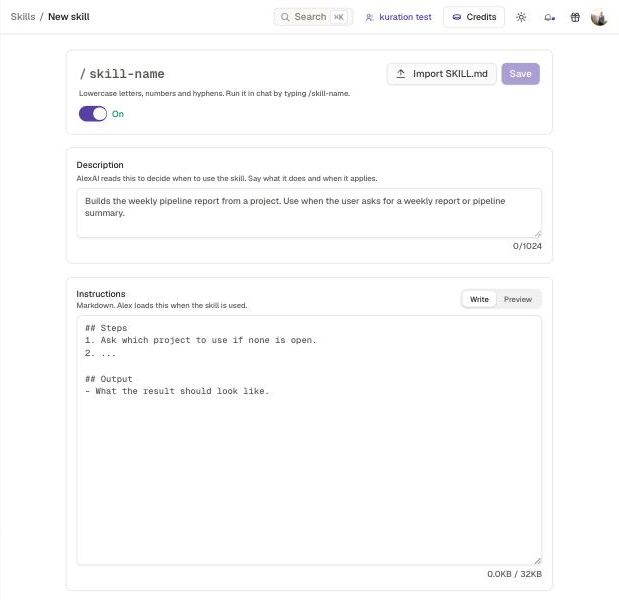
A skill is a set of instructions Alex follows for a job you repeat. Alex reads the description to decide when it applies, or you run it by typing /name in any chat.
- Write one, or import a SKILL.md and export it back
- Share it with your workspace
- Ask Alex to save what you just did as a skill
- Shared skills still ask before any write
Memories
Instructions are the working agreements Alex follows in every chat. Memory files are the notes it writes while working, so decisions survive the conversation they came from.
- Personal memory: your rules and the notes Alex saves for you
- Workspace memory: your ICP, naming and enrolment rules, read by the whole team
- Only owners and admins write workspace memory
- Automations never get the memory write tools
Share with colleagues
Share a chat or an automation with specific colleagues or the whole workspace. They see it read-only and can duplicate it. A duplicated automation starts paused and private, and runs with their own connected accounts.
Agents on every row
Columns that keep watching after the list is built
Most enrichment returns a value once and goes quiet. Monitoring tools stay live on a cell and tell you when something changes. A Scoring Agent column grades every row against your own profile.
Job Change Watch
Arms live job-change monitoring on a person’s LinkedIn URL. When your contact moves, you hear about it.
Funding Alert
Watches a company for new funding, so a raise on your list reaches you while it is still news.
M&A Alert
Flags merger and acquisition activity on the companies you track.
Signals land on the record
A monitored cell reads Monitored until an alert fires. Arming one costs one credit per cell, across people and companies in the same project, and its signals show up on the company or person in your Private Database.
Scoring Agent
Define what a good distributor or buyer looks like in a scoring profile, for companies or for people, and the Scoring Agent column scores every row against it. Ask AlexAI to draft the profile for you.
Point it at your replies
Email, LinkedIn and WhatsApp replies land in one inbox. Tell me when someone replies checks it every hour and emails you the summary.
See EngagementOr drive it from Claude
The same tools are available to Claude, Cursor and any MCP client through the Kuration MCP server.
See the MCP serverGet started

Describe your target. Get your list.
“Data Edge as a Service is coming.”
Aurelien · CEO & Co-founder · Kuration
Use the platform, call the API, or wire it into your agents via MCP. Any market. Any language. Any source.