Lesson 1.2.2
Pull your first 120 companies from Google Maps
What this costs
Sourcing is charged per row produced. Start at 120 rows so the filter later has something to cut.
Before you start
A workspace and a market in mind. No prior project needed.
Google Maps is the fastest route from an empty workspace to real rows, and the rows come with enough detail to filter on immediately. You will end this lesson with a table you have not spent a single enrichment credit on.
- 1
Start a new research project
From the dashboard, click New Research. Name the project after the market and the date, not after the client. You will build several versions of this list and you want to tell them apart later.
 123
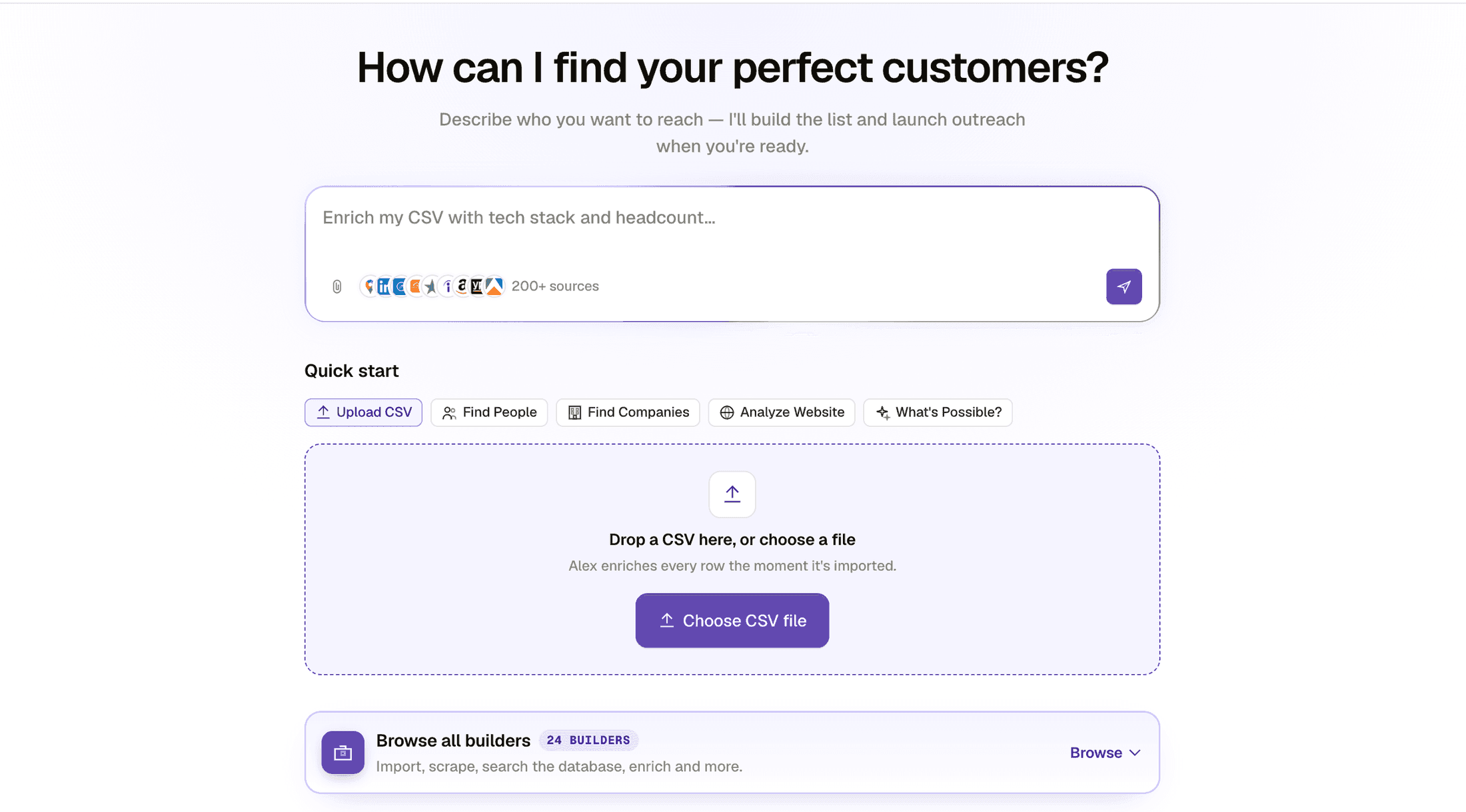
123- 1Describe the list in plain words. This is the fastest way in and it decides everything downstream.
- 2Quick start, when you already know the motion. Upload a CSV, find people, find companies, deep search, or analyse a website.
- 3Browse all builders, when you want to pick the source yourself rather than describe it.
Every project starts here. Describe the list, or pick a builder. - 2
Pick Find Local Businesses by City or Region
It is the builder that searches Google Maps. If you are unsure whether your market has a physical presence, this is the cheapest way to find out.
- 3
Describe the business in plain words
The field asks what business you want to extract. Write it the way you would say it out loud, category then place. Plain phrasing beats clever phrasing: write "bookshops in Japan", not "search for bookshops in Japan".
- 4
Several locations in one search share one total
One request can carry several locations, and they can even carry different searches, like cafes in Paris and clinics in Lyon. What they share is a single total: if the first location fills your row count, the ones after it get what is left, which may be nothing. Split the run when you need a guaranteed number from each city, and keep them together when you just want the total.
- 5
Ask for more than you want to keep
Twenty is the minimum the field accepts. Above that, ask for roughly three times the number of companies you want to end up with, because you are about to cut this list hard. For a 40 row target, ask for 120.
 12345
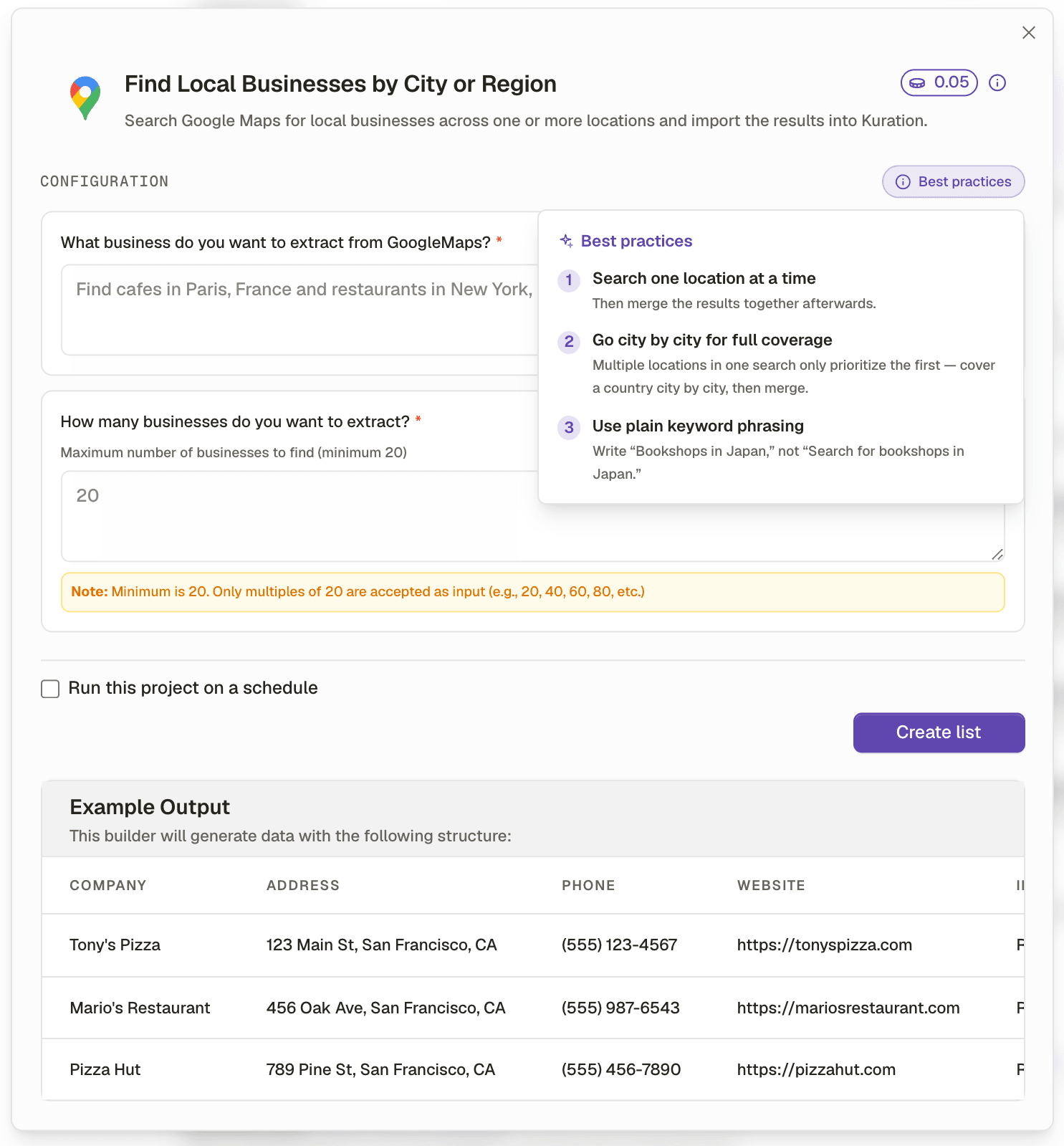
12345- 1The price, on the builder itself. Sourcing is the cheapest step in the whole loop.
- 2What business do you want to extract. Category and place, in plain words.
- 3How many. This is the number that decides whether your filter later has anything to cut.
- 4The rule the field does not spell out until you break it: twenty is the minimum.
- 5Best practices, from the product itself: one location at a time, city by city, plain phrasing.
The whole builder on one screen, including the example output it will produce. The best practices panel is worth reading once: two of the three rules are things people otherwise learn by getting a thin list. - 6
Extract, and watch the table fill
Click Extract. Rows populate in real time. Each one arrives with business name, address, phone number, website, rating, review count, category and opening hours.
- 7
Then run it again, differently
Two more searches, and neither is a repeat. One with a different category phrasing, because solar installers and solar panel companies return overlapping but different sets. One for the next city. Merging them is course 2.3.
What good output looks like
Worked example · A Google Maps extraction, first six columns
| Business name | Category | Rating | Reviews | Website | Phone |
|---|---|---|---|---|---|
| Bayside Solar | Solar energy contractor | 4.8 | 212 | baysidesolar.com | listed |
| Helios Panel Co | Solar energy company | 4.2 | 38 | heliospanel.com | listed |
| Sunline Installers | Solar energy contractor | 3.1 | 9 | not listed | listed |
| Vantage Renewables | Renewable energy supplier | 4.9 | 146 | vantagerenew.com | listed |
Look at row three. No website and nine reviews. That row will fail the filter in the next lesson, and because you have not enriched anything yet, cutting it costs you nothing and saves you the five credits it would otherwise have consumed.
Asked for exactly the number of rows you wanted
- What you see
- Nothing left after filtering, so you either skip the filter or start again
- The fix
- Source three times your target. Sourcing is the cheapest step in the whole loop.
A category term nobody uses
- What you see
- Very few rows return, or the wrong kind of business
- The fix
- Use the words businesses use about themselves on their own listing, not the industry term you use internally.
Location too broad
- What you see
- Results skew to one city and miss the rest of the region
- The fix
- Run several tighter searches by city and merge them, rather than one search for a whole country.
Check yourself
0 of 3 answered1.You want to end up with about 40 companies. How many should you ask the builder for?
2.You ask one Maps search for 60 rows across three cities. How are the rows shared out?
3.You type 10 into the result count and it is rejected. Why?
Try it yourself
Source 120 businesses in a category and city you know well. Do not add a single tool column yet.
- You have done it when
- A table of at least 100 rows where you can already see, by eye, roughly a third you would never contact.
- Credit budget
- Sourcing only. No enrichment credits spent.
Related and next
Recipes that use this skill