Lesson 3.1.1
Schedule a column, schedule a builder, and get notified
What this costs
Free to configure. The runs cost what the runs cost.
Before you start
A workflow you have already run manually at least twice.
There are two different things you can put on a schedule and people confuse them. A builder on a schedule brings in new companies. A column on a schedule refreshes data on companies you already have. They have different costs and different failure modes.
| Scheduled builder | Scheduled column | |
|---|---|---|
| Brings you | New rows | Fresh values on existing rows |
| Cost grows with | How much the source changes | How many rows you already have |
| Main risk | Duplicates and re enriching known companies | Paying repeatedly to confirm nothing changed |
| Control it with | Suppression and existing company checks | Conditions, and a slower cadence |

- 1
Automate a workflow you have run manually twice
Never schedule something you have not watched work. An automation multiplies whatever it was already doing, including the mistakes.
- 2
Match the cadence to how fast the source actually changes
Job postings weekly. A trade association member list quarterly. A permit portal weekly. Refreshing faster than the source changes is pure cost.
- 3
Put conditions on every paid column before scheduling
A condition is enforced on every future run. A filter is not. This is the difference between an automation and a runaway bill.
- 4
Send a notification when the run finishes
A webhook into Slack telling you how many new rows arrived. Without it, an automation that silently stopped looks identical to a market that went quiet.
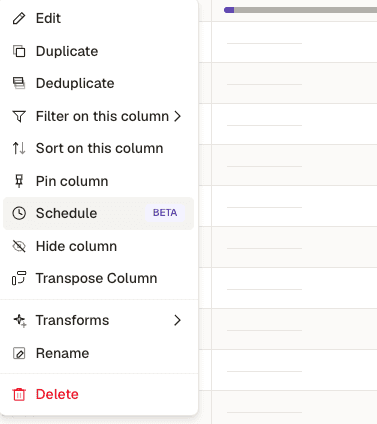
- 1Schedule, on the column you want to keep current.
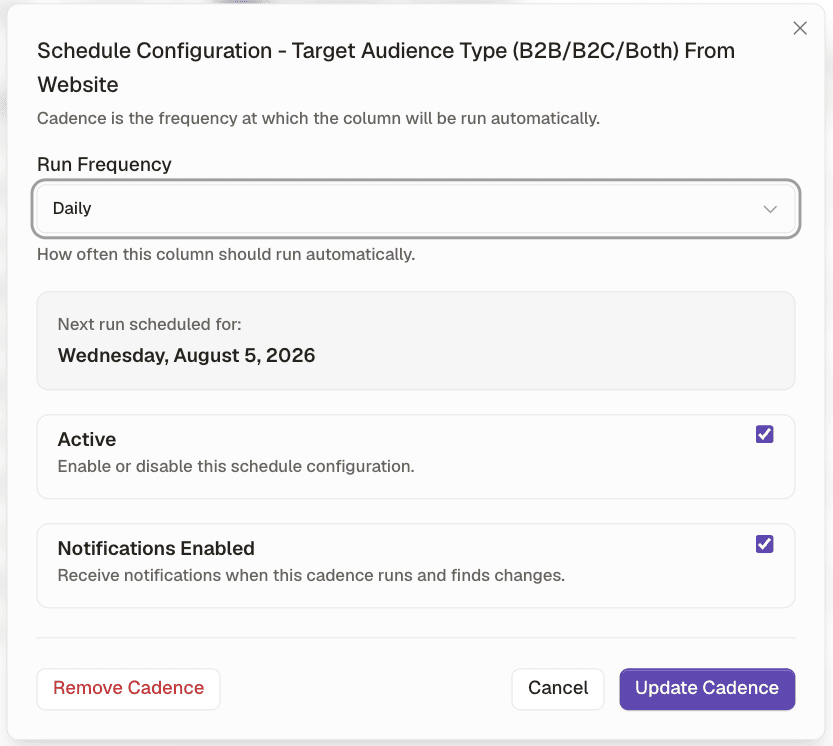
- 1Run frequency. Daily on a job board, quarterly on a member directory.
- 2The next run, stated plainly, so an automation is never a black box.
- 3Notifications when the cadence runs and finds changes. Without this, a stopped automation looks identical to a quiet market.
Check yourself
0 of 3 answered1.What is the difference between scheduling a builder and scheduling a column?
2.How should you pick the cadence?
3.What should you never schedule?