Lesson 2.2.3
Weights, deal breakers, and the scoring formula
What this costs
Free. The Scoring Agent card reads FREE, which is what makes this the cheapest lever in the product.
Before you start
A table with four to six filled columns, and your criteria from lesson 2.2.1.
The scoring agent takes a weighted prompt and returns a score from 0 to 100 with a written rationale. The prompt format is specific, and getting it right is the difference between a number you gate spending on and a number you quietly ignore.
The prompt format
Each criterion carries an explicit weight out of 100, and deal breakers are stated separately as reject rules rather than as heavily negative weights. Weights and rejections do different jobs: a weight moves a score, a rejection ends the conversation.
Score this company as a prospect from 0 to 100.

[weight 30/100] Company size fit
Headcount between 20 and 400. Score full marks in the middle of that range, partial marks at the edges, zero outside it.

[weight 25/100] Market complexity
Sells into more than one country, or into a market where no single database has good coverage. Evidence: the countries column and the market notes column.

[weight 25/100] Timing signal
Currently hiring for a sales, growth or revenue operations role, or has opened a new location in the last twelve months. Evidence: the hiring signal column.

[weight 20/100] Commercial maturity
Has at least one named person with a commercial title. Evidence: the decision maker column.

REJECT IF
- The company is an agency reselling lead data or list building to end clients.
- Headcount is under 5.
- There is no website and no other online presence.
- The company operates only as a marketplace with no direct sales motion.

OUTPUT
A score from 0 to 100, then a two sentence rationale naming which criteria carried the score and which evidence you used. If a criterion has no evidence in the row, say so rather than assuming.
Four rules for the weights
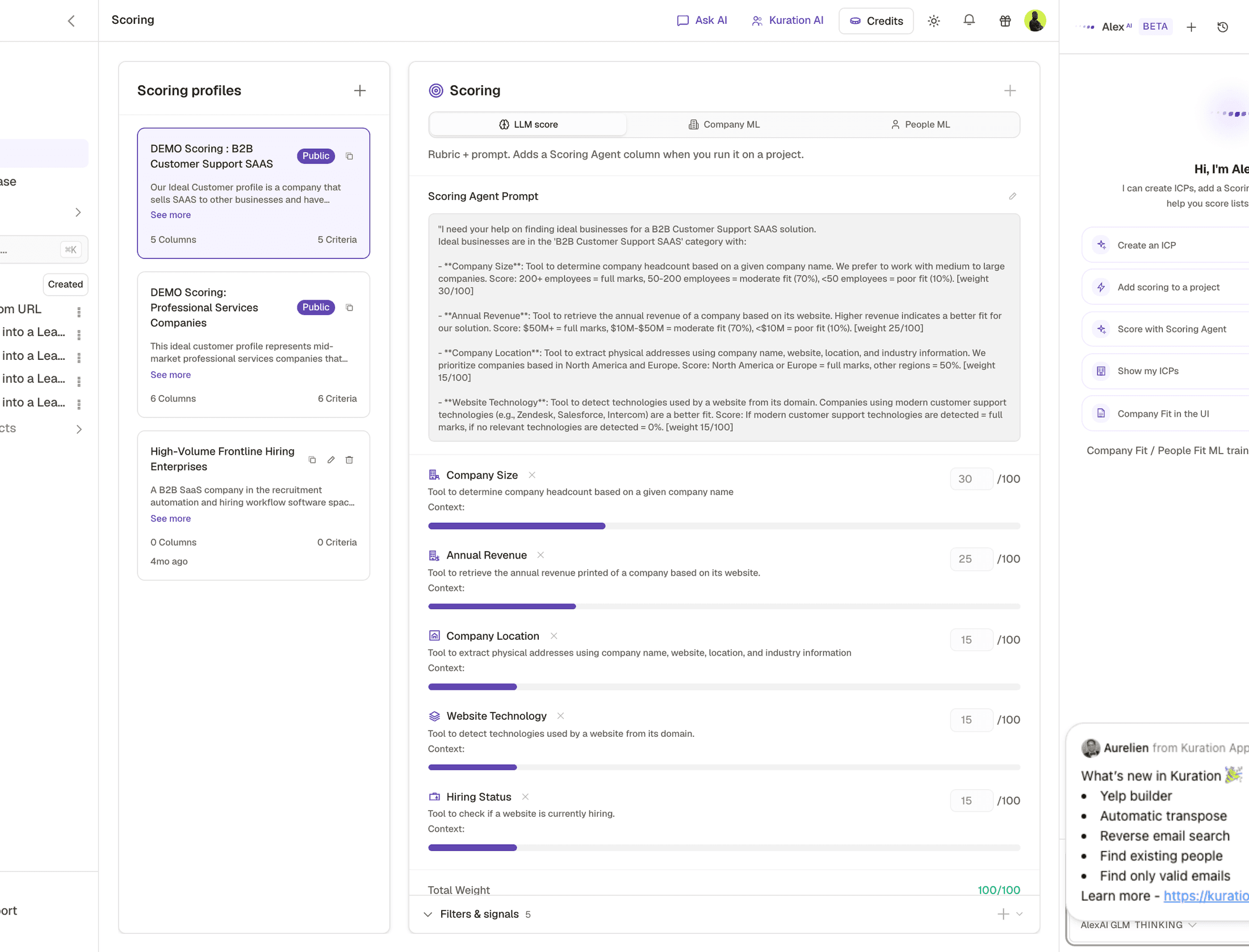
- 1LLM is the scoring mode this course teaches. Company ML and People ML are separate modes that need training data before they can score anything.
- 2Columns and criteria, counted for you. This is the fastest check against the four to six criteria rule below.
- 3Duplicate, edit, delete. Edit is what opens the prompt and the weight controls underneath it.
- 4A new profile starts empty, which is what the prompt above is written to be pasted into.
- Weights add to 100. If they do not, you are not being explicit about what matters most.
- Four to six criteria. Fewer and the score is coarse, more and everything averages to the middle.
- No single criterion above 40. If one thing really decides it, that is a filter, not a scoring criterion.
- Every criterion names the column that provides its evidence. This is what makes the rationale checkable.
- 1
Open the Toolbox and pick the Scoring Agent
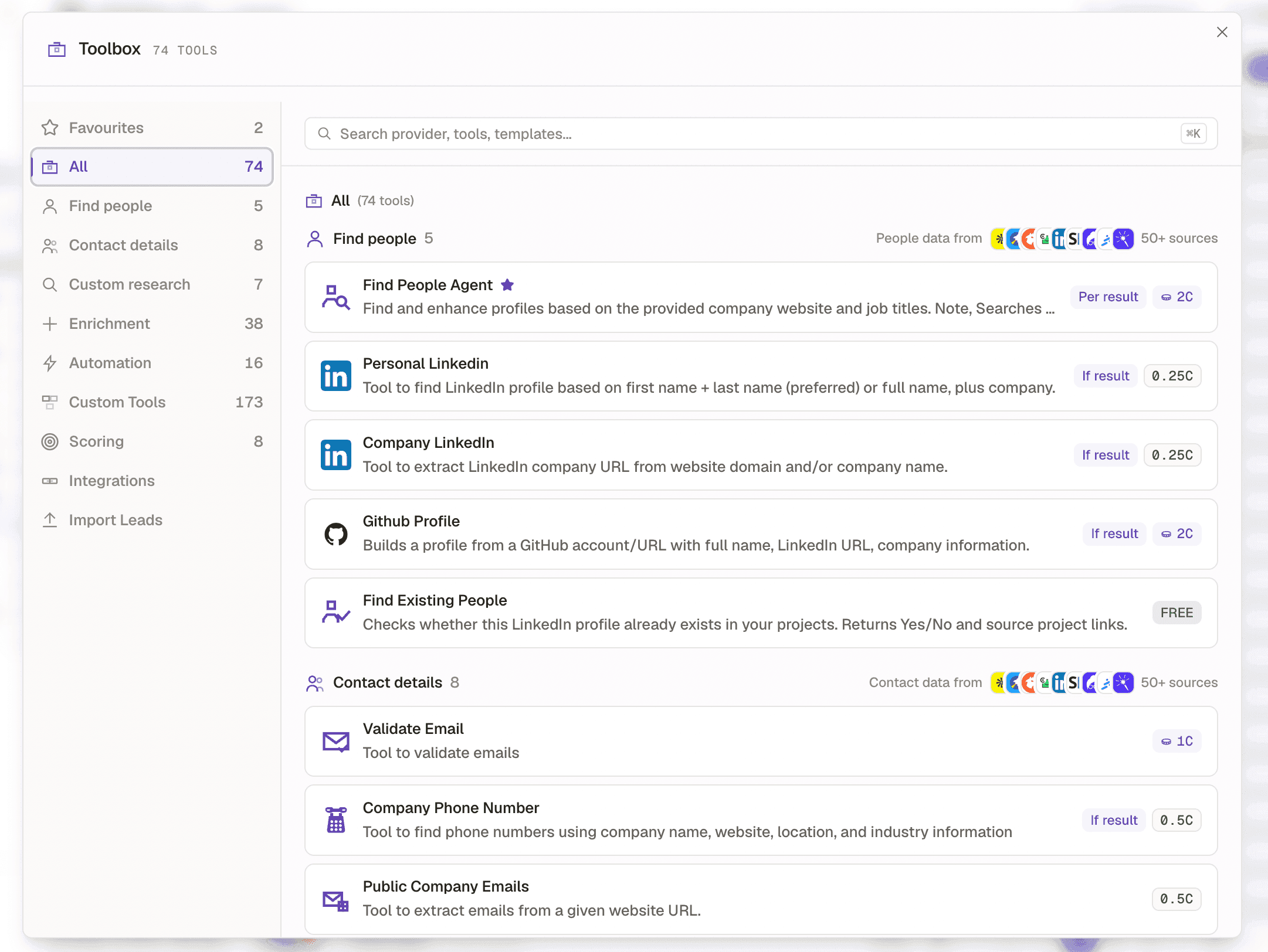
It is under Custom research, not in a category of its own. Configure it as a column on your table.
 1
1- 1Custom research, in the Toolbox sidebar. Scoring Agent is in here.
The Scoring Agent lives under Custom research, alongside the Research AI agent and the Custom Research Tool. It becomes a column like any other tool, and the badge on its card is what makes it worth running early and often. - 2
Paste the weighted prompt
Keep the weight markers and the reject block exactly as formatted. The structure is what the agent reads.
- 3
Run it on 20 rows first
It costs nothing, so there is no reason not to. Read all 20 rationales.
- 4
Check the spread
If every row lands between 50 and 70 your criteria are not discriminating. If everything is 0 or 100 your reject rules are doing all the work. You want a spread across the range.
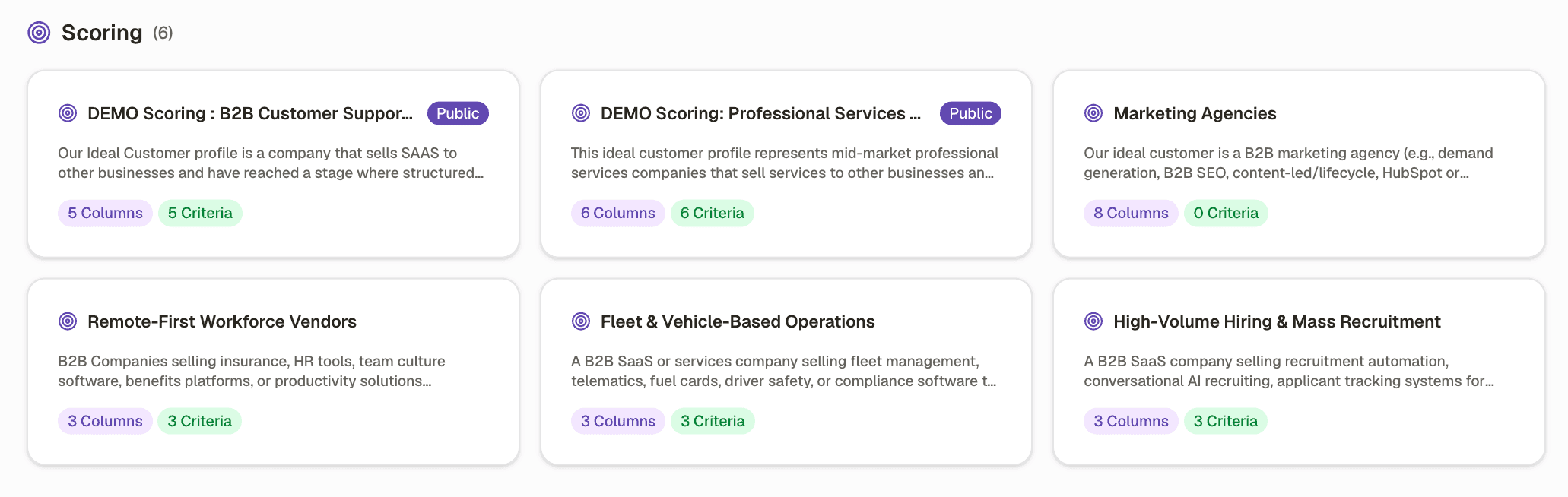
A healthy distribution spreads across the range. A flat middle means the criteria are not discriminating. - 5
Fix the criterion, not the score
When a row scores wrongly, read its rationale and find which criterion caused it. Edit that criterion. Never patch a score by adding a rule about a specific company.
- 6
Run it across the table
Still free. Run it on everything, including rows you think will fail, because the failures are what confirm the model works.
Worked example · A healthy score distribution over 200 rows
| Score band | Rows | What it means |
|---|---|---|
| 90 to 100 | 14 | Strong fit and a live trigger. Work these first |
| 70 to 89 | 48 | Good fit. The main working list |
| 50 to 69 | 71 | Fit but no trigger, or a trigger with weak fit. Nurture |
| 1 to 49 | 52 | Weak. Cut unless volume matters more than reply rate |
| 0 | 15 | Hit a reject rule. Cut |
Weights do not add to 100
- What you see
- Scores cluster oddly and are hard to reason about
- The fix
- Make them add up. It forces you to decide what actually matters most.
Deal breakers written as negative weights
- What you see
- Disqualified companies still score 40 or 50 and slip through a threshold
- The fix
- Put them in the reject block. A deal breaker is not a heavy penalty, it is an exit.
Everything scores 50 to 70
- What you see
- A flat distribution with no useful cut point
- The fix
- Your criteria are true of everyone. Replace them with ones that split the list.
Rationale cites evidence the row does not contain
- What you see
- Confident scoring on missing data
- The fix
- Add the instruction to say when a criterion has no evidence, and add the missing column.
Check yourself
0 of 3 answered1.Where do deal breakers belong?
2.Every row scores between 50 and 70. What is wrong?
3.A row is scored wrongly. What do you fix?
Try it yourself
Write your weighted prompt with four to six criteria and at least two reject rules. Run it on 20 rows and read every rationale.
- You have done it when
- The 20 scores spread across at least four bands, and you agree with at least 17 of them.
- Credit budget
- Free.
Related and next
Recipes that use this skill