Lesson 1.3.1
The templates, and what each one needs from you
What this costs
Free to browse. Templates state their cost before they run.
Before you start
Nothing.
A template is a workflow someone already built: a source, a set of tool columns, and an order. You supply one input and it produces a complete enriched list. The only decision that matters is which input you already have.
Templates sort by what you bring, not by industry
They sit on the home screen in two places. A row of one click workflows across the top, and the full set under Browse all builders with the Templates filter on. The card tells you what it needs from you and lists the steps it will run before you commit to anything.
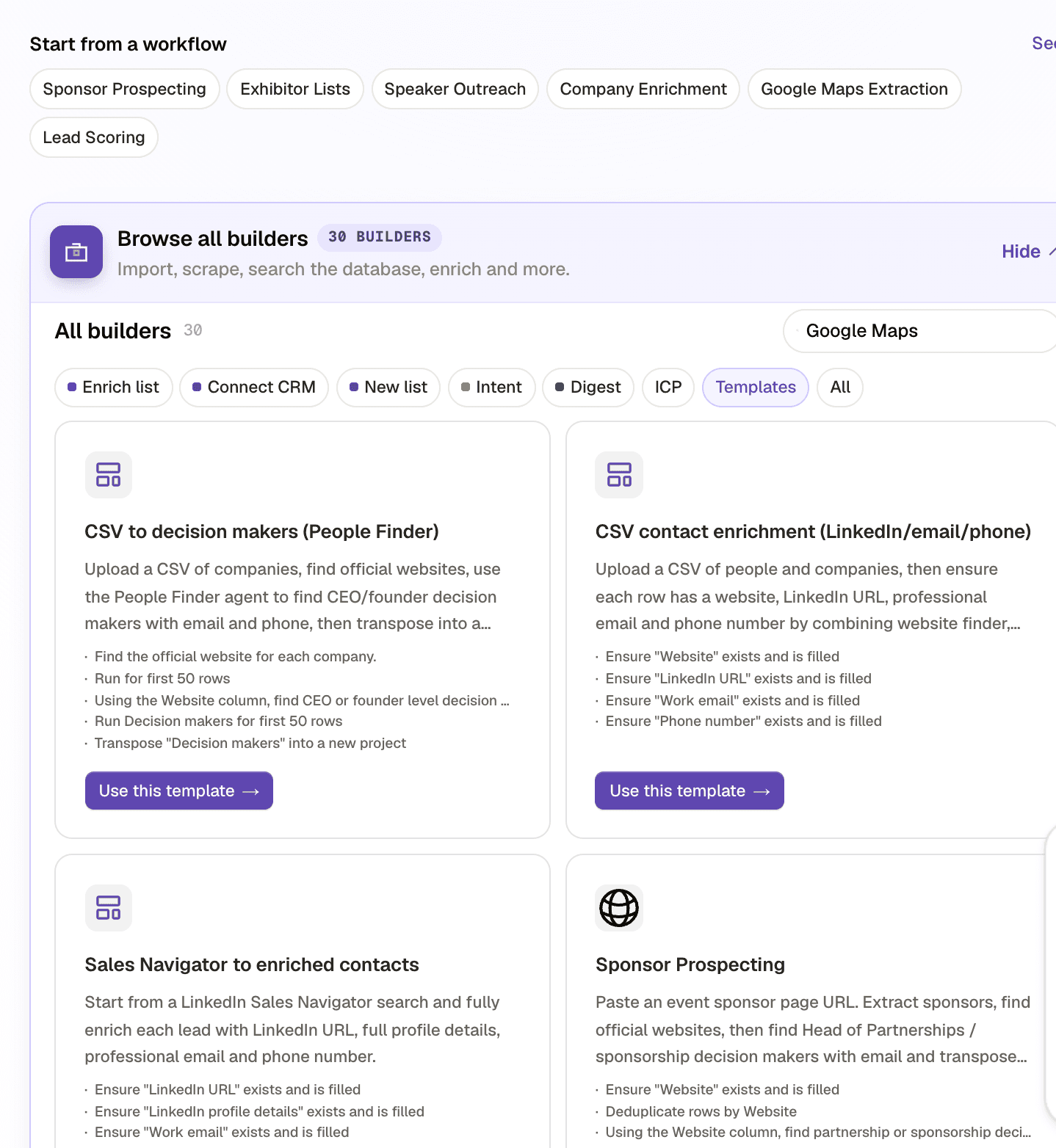
- 1The one click workflows: sponsor prospecting, exhibitor lists, speaker outreach, company enrichment, Google Maps extraction, lead scoring.
- 2The Templates filter, inside Browse all builders, for the full set.
- 3The steps the template will actually run, written out on the card.
- 4Use this template. It creates the project with those steps already configured.
| If you already have | Reach for | You get back |
|---|---|---|
| A CSV of companies and no contacts | CSV to decision makers | Websites found, decision makers with email and phone, transposed to people rows |
| A CSV of people missing fields | CSV contact enrichment | Website, LinkedIn, work email and phone filled on every row |
| A Sales Navigator search | Sales Navigator to enriched contacts | Full profile details, work email and phone per lead |
| An event sponsor page URL | Sponsor prospecting | Sponsors resolved to companies, then partnership decision makers |
| An exhibitor list or show guide | Exhibitor lists | Exhibiting companies with their event context attached |
| A category and a city | Google Maps extraction | Local businesses with the details Maps publishes |
| A list you want ordered | Lead scoring | An ICP score per row, ready to threshold |
Read the template before you run it
A template is a stack of columns, and each column has a cost and a charging behaviour. Open it and read the column list before running. If it contains a people search and you are about to point it at 800 rows, you want to know that first. Everything from lesson 1.1.4 applies to templates exactly as it applies to columns you built yourself.
Check yourself
0 of 2 answered1.How should you choose a template?
2.What does a template card tell you before you run it?
Related and next
This lesson is written and complete. Its screen recording is still to come, and the written walkthrough is designed to stand on its own without one.