Most lists die at the same step. You have the companies, you have the people, and then you have a column of email addresses where roughly a third are wrong, a tenth will bounce, and nobody can tell you which is which until the campaign has already run.
The fix is not a better provider. Every provider has gaps, and the gaps are different for each one. The fix is a waterfall: several providers chained so that each only runs when the one before it found nothing, followed by verification that tells you what you actually have.
This is a walkthrough of building one. It covers the order to put providers in, why that order matters more than the choice of providers, how to verify without throwing away good addresses, and how to read the results so you know which rows are safe to send to.
Why One Provider Is Never Enough
Ask any single email provider for a thousand contacts and you will get somewhere between four and seven hundred back. The other three to six hundred are not lost causes. They are simply outside that provider's coverage, and a different one will often find them immediately.
Coverage varies by geography, by company size, and by how much the person publishes about themselves. A provider strong on North American technology companies can be weak on European manufacturers. A provider that excels at large enterprises may return almost nothing for companies under fifty staff.
Running them in sequence rather than picking one turns three separate seventy percent tools into one that clears ninety. The cost of doing it properly is lower than running one provider across everything, because each provider only touches the rows the previous one failed on.
The Order Matters More Than the Providers
A waterfall run in the wrong order costs more and returns worse data. Three rules decide the sequence.
Cheapest First, Not Best First
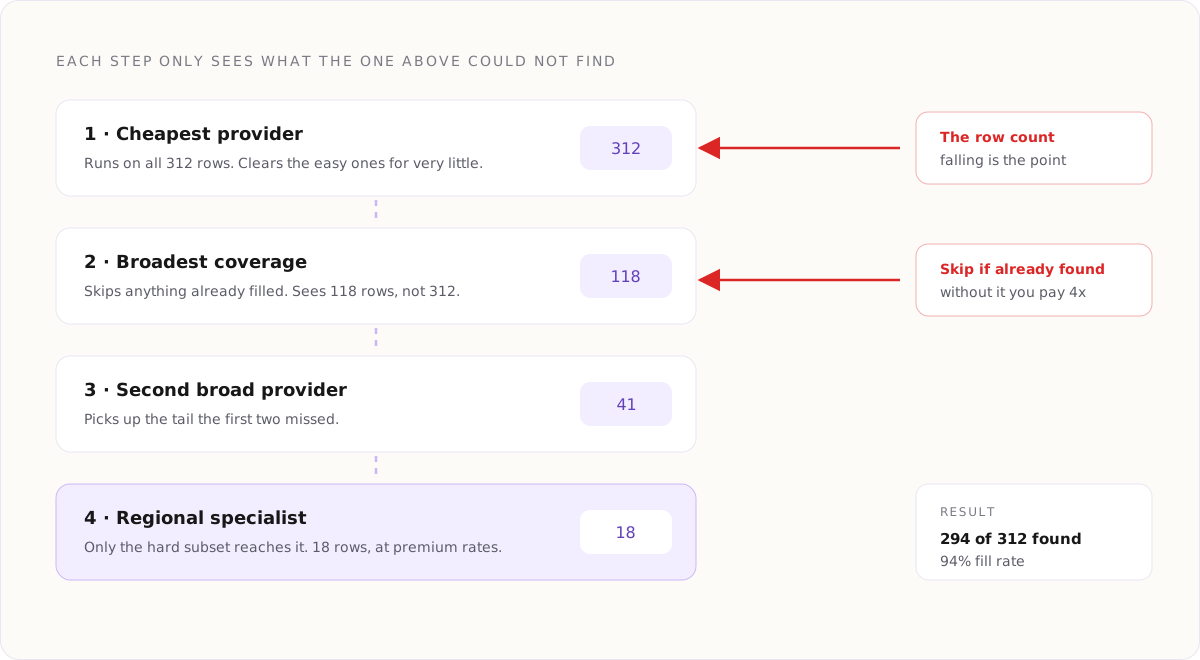
Put your lowest cost provider at the top even if its coverage is middling. It will clear the easy rows for very little, and the expensive providers will only ever see the hard ones. Leading with your most accurate tool means paying premium rates for addresses a cheap tool would have found.
Highest Coverage in the Middle
The second and third positions do the real work. This is where your broadest provider belongs, the one that handles the widest range of company types even if it costs more per hit.
Specialists Last
A provider that is exceptional for one region or one company size goes at the bottom. By the time rows reach it, the general providers have already cleared everything they can, and what is left is exactly the hard subset the specialist is good at.
Building It, Step by Step
The mechanics are the same wherever you build this. What follows assumes a table with a company column, a person column and a domain column already filled.
Step One: Add the First Provider as a Column
Add an email finder column and point it at the person and domain columns. Run it on a sample of twenty five rows first, never the whole list. You are checking that the mapping is right, not that the provider is good.
Step Two: Chain the Second Provider to the First
Add a second email finder, and this is the step that makes it a waterfall rather than four separate runs: set it to skip any row where the first column already returned a value. Without that condition you pay four providers for the same address.
Step Three: Repeat, Watching the Row Count
Add the third and fourth in the same way. Each should be conditioned on every column above it being empty. Watch the number of rows each one runs on. If provider three is running on almost as many rows as provider two, your first two are weaker than you thought and the order needs revisiting.
Step Four: Collapse Into One Column
You now have four sparse columns. Collapse them into a single email column that takes the first non empty value across the chain. Keep the source columns rather than deleting them, because knowing which provider found an address is how you learn where each one is actually strong.
Verification Is a Separate Job
Finding an address and confirming it exists are different operations, and a provider telling you it found something is not the same as that thing being deliverable.
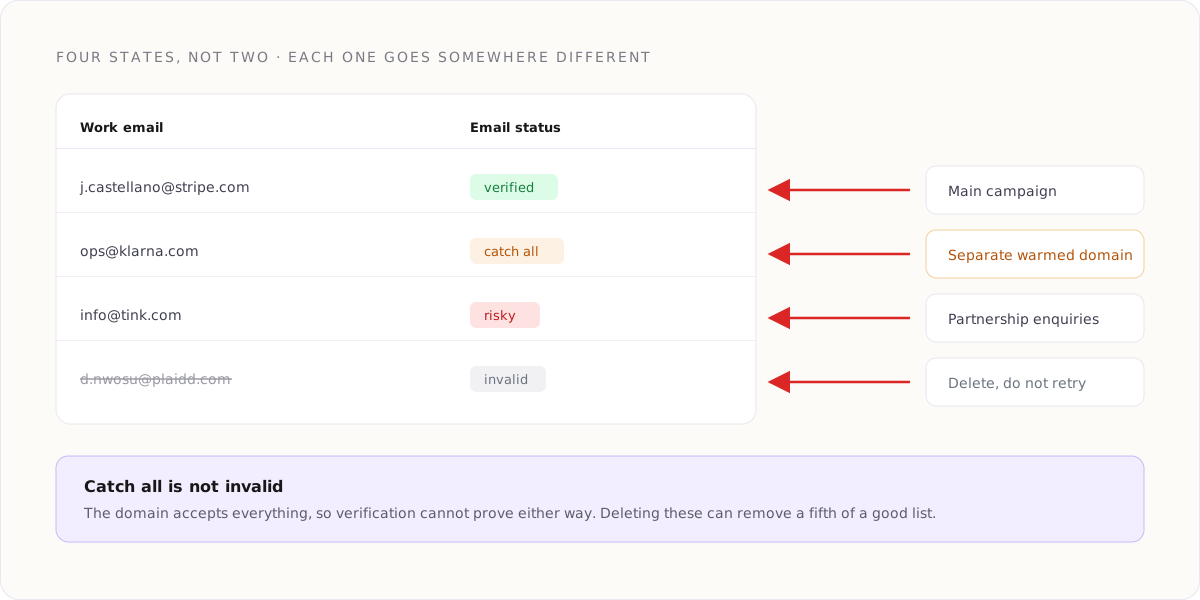
Run verification as its own column across the collapsed result. What comes back is not a yes or no. It is one of four states, and treating them as two is where most teams damage their sending reputation.
Verified
The mail server confirmed the mailbox exists. Safe to send to. This should be the large majority of a well built list.
Catch All
The domain accepts mail for every address, whether or not the mailbox exists, so verification cannot prove anything either way. These are not invalid. Many are perfectly good, and whole industries run catch all domains as a matter of policy.
Risky
The server responded in a way that suggests a problem: a temporary rejection, a known spam trap pattern, or a role address like info or sales that no individual reads.
Invalid
The mailbox does not exist. Sending to these is what drives a bounce rate up, and a bounce rate above roughly two percent is what gets a sending domain into trouble.
What to Do With Each State
The point of verifying is not to produce a clean number. It is to route each row somewhere sensible.
- Verified goes into your main campaign with no special handling.
- Catch all goes into a separate campaign on a different sending domain, at lower volume. You are guessing, so guess somewhere that cannot damage your primary reputation.
- Risky role addresses are worth keeping for a different purpose. An info address is useless for a personal opener and fine for a partnership enquiry.
- Invalid is deleted, not retried. If the mailbox does not exist today it will not exist next week, and keeping it means eventually somebody sends to it.
Keep the state on the row rather than filtering it out of the table. Six weeks later, when reply rates differ between two segments, you want to be able to see whether the difference was the copy or the email quality.
The Numbers Worth Watching
A waterfall is easy to build and easy to run badly. Four figures tell you whether yours is working.
- Fill rate. What share of rows ended with an address. Below eighty percent on a well defined list usually means the person or domain columns are the problem, not the providers.
- Verified share. What share of found addresses came back verified. Below seventy percent suggests a provider in the chain is guessing at patterns rather than confirming them.
- Cost per verified address. Not cost per row and not cost per found address. This is the only figure that lets you compare two chain orders honestly.
- Provider contribution. How many addresses each step contributed. A provider contributing under five percent is not earning its place in the chain.
Common Mistakes
Running Every Provider on Every Row
The most expensive mistake, and the easiest to make, because it happens automatically if you forget the skip condition. Check the row count on each step before you run the full list.
Deleting Catch All Rows
A large share of perfectly good business addresses sit on catch all domains. Deleting them can remove a fifth of a list for no reason. Route them, do not bin them.
Verifying Once and Never Again
Email addresses decay at roughly two to three percent a month as people change jobs. A list verified in January and sent in June is not a verified list. Re verify before any send against data older than about a quarter.
Trusting the Provider's Own Confidence Score
Some providers return a confidence figure alongside the address. It reflects how sure their pattern matching is, not whether the mailbox exists. Independent verification is a different check and both are worth having.
Frequently Asked Questions
How many providers should a waterfall have?
Three or four is the usual sweet spot. The first two clear most of the volume, the third picks up a meaningful tail, and a fourth is worth it only if it is a genuine specialist. Beyond that you are paying for diminishing single digit percentages.
Is a catch all address safe to send to?
Safer than most people assume, but not risk free. The address may not exist, and you will not learn that until it bounces. Send to catch all rows from a separate domain at lower volume, so a bad batch cannot reach your primary sending reputation.
What bounce rate should I be aiming for?
Under two percent. Above that, mailbox providers begin treating the sending domain as careless, and the damage takes far longer to repair than it took to cause.
Does verification guarantee delivery?
No. It confirms the mailbox exists. Whether your message reaches the inbox also depends on your domain reputation, your authentication records, your sending volume and your content. Verification removes one failure mode out of several.
How often should a list be re verified?
Before any send against data older than about ninety days. For a list you contact continuously, a rolling monthly re verification of the oldest portion is cheaper than re verifying everything at once and keeps the whole list inside a usable age.
Should I verify addresses a provider already marked as verified?
Yes, if the data is more than a few weeks old. The provider verified it at the moment it was found. People leave, mailboxes close, and nothing about the earlier check updates itself.
The Short Version
One provider will find somewhere around two thirds of your list. Chaining three or four, cheapest first, each one skipping the rows already solved, will take you past ninety percent for less money than running one provider across everything.
Then verify separately, and read the four states rather than collapsing them into good and bad. Send to verified, route catch all somewhere safe, repurpose the role addresses, delete the invalid ones. Watch cost per verified address rather than cost per row, and re verify anything older than a quarter before it goes anywhere near a campaign.