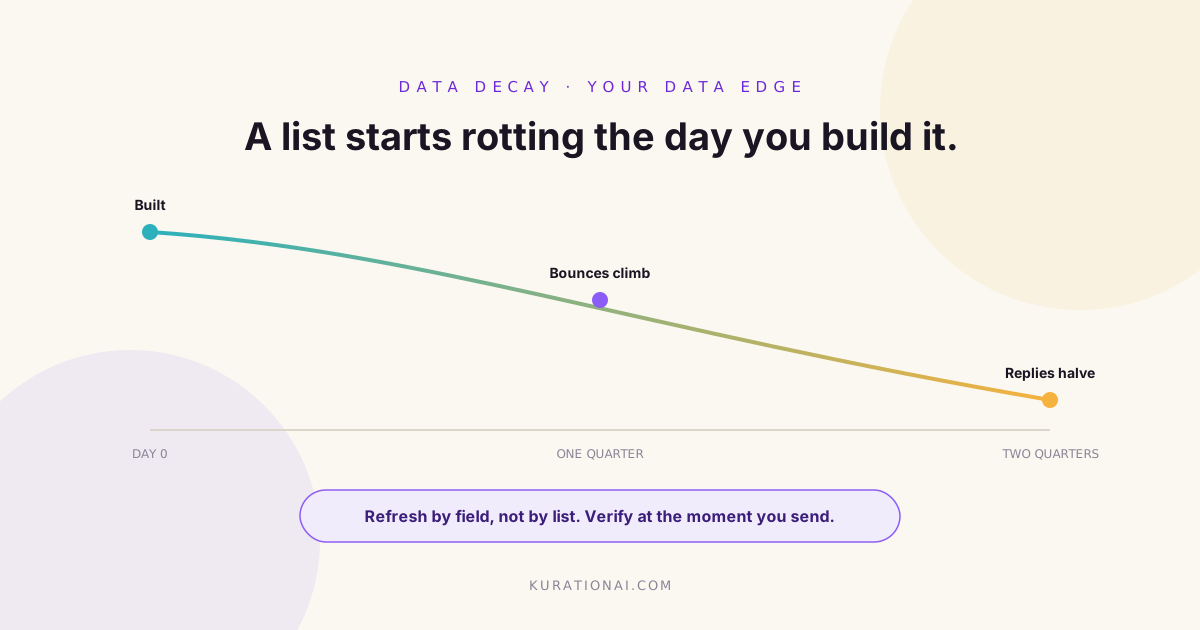
A prospect database does not fail loudly. Nobody gets an alert when a contact changes job, a company moves office or an email address quietly stops existing. The list looks exactly as it did the day you built it, which is the problem.
Data decay is the slow drift between what your database says and what is actually true. It shows up as rising bounces, falling reply rates and sales conversations that open with an apology. This guide covers how to measure decay in your own data, how often to refresh which fields, and how to re verify records without rebuilding the list every quarter.
One distinction first, because it is easy to blur. A signal expires: a job post gets filled, an event finishes. A record decays: the fact it stated was true and gradually stopped being true. Both need managing, and they need managing differently.
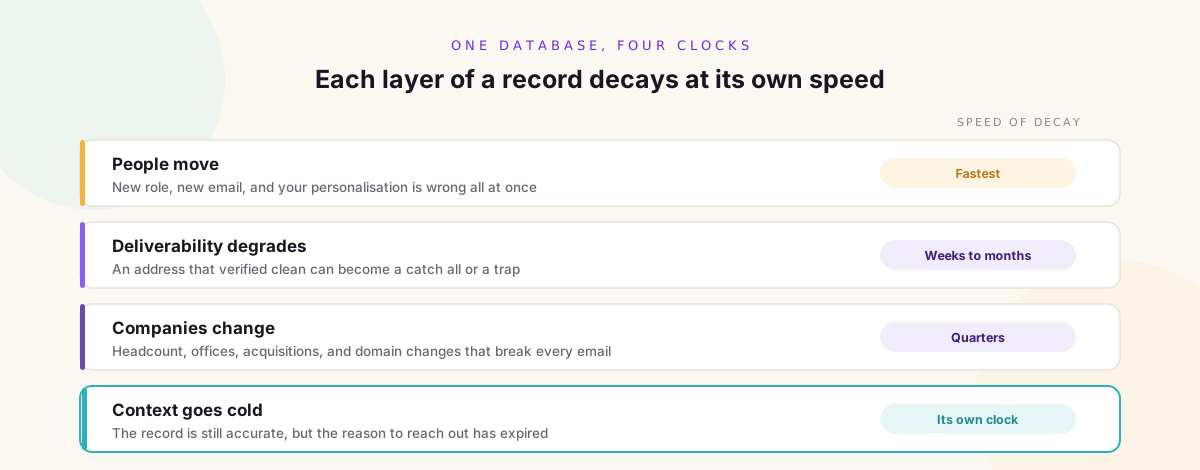
Four Things Decay, at Four Different Speeds
Treating a database as one thing that goes stale at one rate is what leads to either pointless full rebuilds or no maintenance at all. Break it apart.
People move
The fastest moving layer and the most damaging. A contact who changed roles takes their email, their title and their relevance with them. Everything downstream of the person, including your personalisation, is wrong at once.
Companies change
Slower, but structural. Headcount moves, offices open and close, companies get acquired, rebrand or change domain. A domain change silently breaks every email you hold for that company.
Deliverability degrades
An address that verified clean six months ago can be a catch all, a role account or a trap today. This layer is worth separating because it damages your sending reputation as well as your campaign.
Context goes cold
The reason the company was on the list at all. The funding round is old news, the role was filled, the facility opened a year ago. The record is still accurate and the reason to call is gone.
Measure Your Own Decay Before Copying Anyone's Number
You will see a figure quoted for how fast B2B data decays each year. Treat it as a prompt to measure rather than an answer, because the real rate depends entirely on who you sell to. A list of enterprise procurement leads and a list of early stage founders do not rot at the same speed.
Measuring it is not difficult.
- Take a random sample of a hundred records from a list you built at a known date
- Re verify each one by hand or through enrichment, and record what changed
- Count what moved: person gone, title changed, email dead, company changed, reason expired
- Divide by the age of the list to get a monthly drift rate for each layer
Repeat that once a quarter on a fresh sample and you have your own decay curve, which is far more useful than an industry average, because you can set a cadence against it.
The Symptoms, and What Each One Points At
Campaign metrics tell you which layer is rotting, if you read them as diagnostics rather than as scores.
- Bounces climbing across otherwise healthy sends points at the deliverability layer
- Replies saying the person has left the business points at the contact layer
- Replies saying this is not my area points at titles drifting, or at bad targeting
- Falling reply rates with stable deliverability often points at context going cold
- Sudden domain wide failures point at a company changing domain or being acquired
The reason this matters is that each symptom has a different fix. Re verifying emails does nothing for a list whose problem is that the reason to reach out expired four months ago.
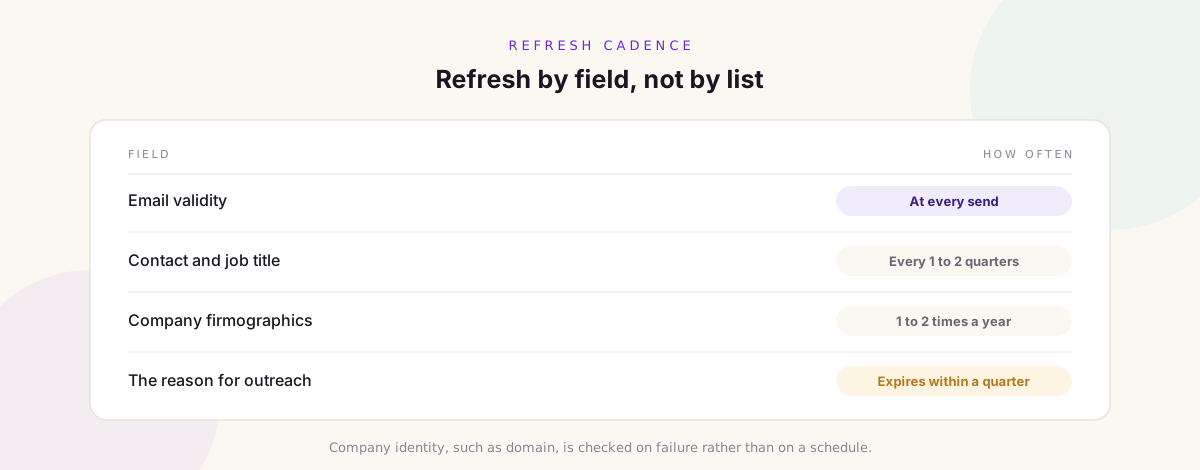
Set a Refresh Cadence Per Field, Not Per List
Once you know which layers move fastest, you can stop refreshing everything at once. A workable starting point looks like this, then gets tuned against your own measured rates.
- Email validity: verify immediately before every send, not on a schedule
- Contact and title: re check every one to two quarters for active lists
- Company firmographics: once or twice a year unless a signal suggests change
- The reason for outreach: expire it on its own clock, typically within a quarter
- Company identity, such as domain and legal entity: check on failure, and after any acquisition news
The single highest value item on that list is verifying at send time. Most bounce damage comes from validating a list once at build time and then sending from it for months.
Verify at the Point of Send, Not at the Point of Import
This is the change that pays for itself fastest. An address verified at import is a statement about the past. An address verified in the hours before a send is a statement about now.
It also protects the asset that is hardest to rebuild, which is your sending reputation. Bounces are not just wasted emails, they are a signal to mailbox providers about the quality of your list, and that damage outlasts the campaign that caused it.
Re Verify, Do Not Rebuild
The instinct when a list underperforms is to throw it out and source a new one. That is usually the expensive option, because most of the work in a good prospect list is the research that got the company onto it, and that layer decays slowest.
A re verification pass keeps the expensive part and repairs the cheap part. Confirm the company still fits, then repair the contact layer beneath it. In most databases the company research survives long after the contact details have stopped being useful.
What to Do With a Record That Fails
Failure is not one outcome, and treating it as one loses information you already paid for.
- Person has left, company still fits: keep the company, find the replacement in that role
- Title changed inside the company: update it and re assess whether they are still your buyer
- Email dead but person present: re enrich the address rather than dropping the record
- Company acquired: check whether the parent is now the account, which is sometimes an upgrade
- Company no longer fits the profile: archive it with the reason, so it is not re sourced next quarter
- Person objected or unsubscribed: suppress permanently, and never let an import resurrect them
That last one is worth a hard rule rather than a process. Suppression should sit above every list and survive every rebuild.
Keep the Evidence, Not Just the Value
The practice that makes all of this cheap is recording where each field came from and when. A record that carries its source and a date can be re checked against that source automatically. A record that is just a value in a cell has to be re researched from scratch.
This is the difference between a database you can maintain and a database you can only replace. It costs almost nothing to capture at build time and is nearly impossible to add later.
Some Markets Rot Faster Than Others
Decay rates are not evenly spread across your database, which means a single cadence is always wrong somewhere. It is worth knowing which of your segments are the fast ones.
- Fast moving: startups and scale ups, agencies, sales and marketing roles, anywhere headcount is growing quickly
- Middling: mid market operations and finance roles, regional offices of larger groups
- Slow moving: family owned manufacturers, licensed and regulated businesses, public sector suppliers, long tenure technical roles
The practical move is to tag segments by speed and give the fast ones a shorter cycle. A quarterly re check on a list of founders is barely enough, while the same cadence on a list of licensed industrial operators is largely wasted effort.
This also changes how you read a campaign. A high bounce rate on a fast segment is normal maintenance, while the same rate on a slow segment usually means something structural happened, such as an acquisition or a domain migration, and is worth investigating rather than simply cleaning.
Automate the Boring Half
Almost everything above is mechanical and belongs on a schedule rather than in somebody's head.
- Sampling and drift measurement on a fixed quarterly cycle
- Verification triggered by a send rather than by a calendar
- Re enrichment for records that fail, queued automatically
- Expiry on the outreach reason, so cold context leaves the active list by itself
- Alerts on domain level failures, which usually mean something structural changed
What stays human is the judgement: whether a company still fits, and whether a changed title is still your buyer. Those are the two decisions worth a person's attention, and they are much easier to make when everything else is already current.
A Worked Example
A team built 2,000 companies with named contacts in January. By June, replies had halved and bounces had roughly tripled, and the instinct was that the list was burnt.
A hundred record sample said otherwise. Around a fifth of contacts had moved role, a tenth of emails no longer resolved, a handful of companies had changed domain after acquisition, but more than nine in ten companies still fitted the profile that put them on the list.
So the fix was not a rebuild. They kept the company layer, re enriched the contact layer beneath it, moved verification to send time, and expired any outreach reason older than one quarter. The list came back without the sourcing being repeated, and the quarterly sample became a standing job.
Common Mistakes
- Validating emails once at import and sending from that list for months
- Refreshing every field on the same schedule, which overworks the slow layers
- Rebuilding lists instead of repairing the contact layer under good company research
- Reading falling reply rates as a copy problem when the data is the problem
- Storing values without their source or date, so nothing can be re checked cheaply
- Letting a fresh import resurrect contacts who previously opted out
How Kuration AI Helps
Kuration AI keeps the source and the date behind every field it collects, so records can be re checked against where they came from rather than researched again. Enrichment can be re run per column, which means repairing a contact layer without disturbing the company research underneath it.
Because discovery is signal driven, the reason a company entered the database is stored alongside it and can be expired on its own clock, which keeps cold context from quietly ageing inside an otherwise healthy list.
Frequently Asked Questions
How fast does B2B data decay?
Fast enough to matter within a quarter, and the exact rate depends on your market. Rather than adopting a published figure, sample a hundred records from a list of known age, count what changed, and derive your own rate per layer.
How often should I clean my prospect database?
Per field rather than per list. Verify email validity immediately before each send, re check contacts and titles every one to two quarters on active lists, and review company firmographics once or twice a year unless a signal suggests something changed.
Should I delete records that bounce?
Not automatically. A bounce usually means the address is wrong, not that the company stopped being a fit. Try to re enrich the contact first, and only archive the company if it no longer matches your profile.
Is it better to rebuild a list or refresh it?
Refresh in most cases. The company research is the expensive part and it decays slowest, while the contact layer is the cheap part and decays fastest. Rebuilding pays to redo the durable half.
What causes reply rates to fall when deliverability is fine?
Usually the reason for the outreach has gone cold. The record is still accurate but the trigger that justified contacting that company has expired, so the message reads as generic even though the data is correct.
Can data decay be automated away?
The mechanical parts can: sampling, verification, re enrichment and expiry all run on a schedule. What stays human is deciding whether a company still fits and whether a changed job title is still your buyer.
A List Is a Living Thing
The teams with the best outbound data are rarely the ones who sourced the best list. They are the ones who accepted that a list starts decaying the day it is built, and who put a small amount of maintenance on a schedule instead of a large rebuild on a panic.
Measure your own drift, refresh by field rather than by list, verify at the moment you send, and keep the evidence behind every value. Do that and the same database keeps working long after an unmaintained one has quietly stopped.
Keep a Prospect Database That Stays Current
Kuration AI records the source and date behind every field, re runs enrichment per column so you can repair contacts without touching the company research, and keeps the signal that surfaced each company so cold context can expire on its own. Build a database that is maintainable rather than disposable.