Most teams describe their prospecting workflow as one job. In practice it is four, and only one of them is actually research. Someone decides what the list should contain. Someone builds and enriches it. Someone moves the finished result somewhere it can be used. Someone tells the rest of the team it is ready.
Three of those four are moving things from one place to another. They are repetitive, they follow the same shape every time, and they are exactly where the hours quietly go. The fourth is judgement, and judgement is the part that should stay in human hands.
This is a practical guide to automating a prospecting workflow: which handoffs are worth wiring up, what a recipe actually looks like, where automated pipelines fail silently, and which steps you should deliberately refuse to automate.
The Three Handoffs That Cost You Time
Watch where a prospect list actually loses time and it is almost never inside the research. It is at the seams.
The first seam is getting data in. A demo request arrives, someone reads it, opens the platform, creates a project and types the company name. That is two minutes of work that happens fifty times a month and requires no thought at all.
The second seam is getting results out. A list finishes. It sits there until somebody remembers to export it, opens the CRM, maps the columns and imports it. The value of that list starts decaying the moment it is finished, and this step is usually where the delay lives.
The third seam is telling people. The list is done and nobody knows. It waits in a tab until a standup, or until the person who asked for it follows up. Nothing is broken, the work is just parked.
None of those three require a decision. They require someone to notice and act, which is precisely what software is better at than people.
Why the Research Itself Is the Wrong Thing to Automate
There is a tempting version of this where you automate everything, including the building of the list, and wake up to finished prospects every morning. Resist it, for a reason that has nothing to do with technology.
Research contains choices. Whether a company that sells to both consumers and businesses counts as a fit. Whether a fifty person company with enterprise customers belongs on a list built for mid market. Whether a signal you found is a reason to reach out or just noise. Those calls are the difference between a list that converts and a list that annoys people, and they are not obvious enough to encode once and forget.
Automate around that step, not through it. The pattern that works is simple: machines move the data, people decide what it means.
Triggers, Actions and Recipes in Plain Terms
Every automation, in any tool, is built from the same two pieces. The vocabulary sounds technical and is not.
A trigger is a when
Something happened and the automation should wake up. A form was submitted. A project was created or updated. A schedule reached Monday morning. A row appeared in a spreadsheet.
An action is a then
Something should now be done. Create a project from a saved builder. Add a company to an existing project. Fetch the rows of a project. Post a message. Write a row.
A recipe is one of each
Put a when in front of a then and you have an automation. When a demo request form is submitted, then create a project from your saved builder. That is the whole idea, and everything else is variations on it.
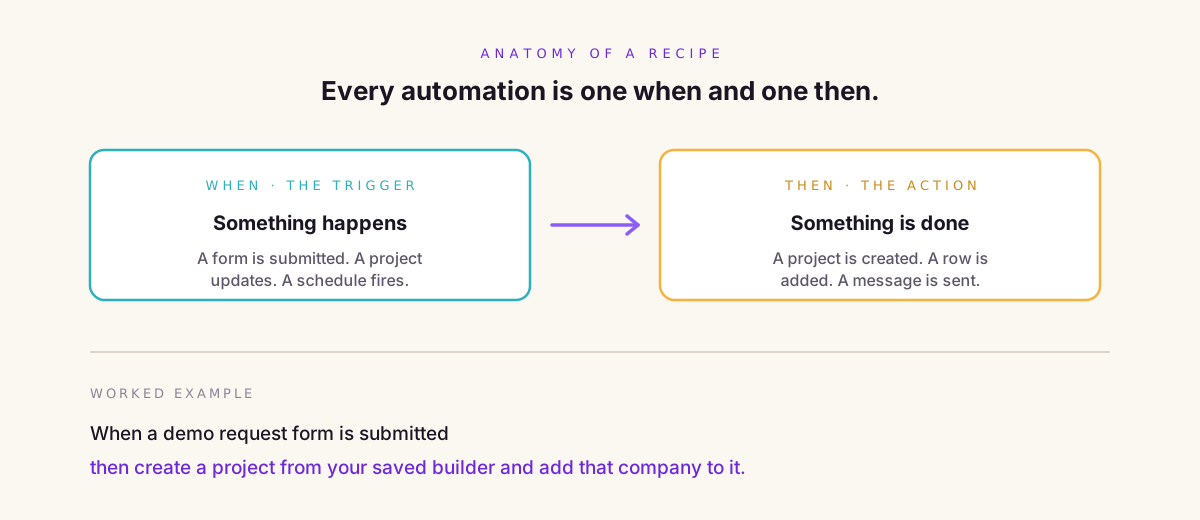
Kuration connects to this world through viaSocket, which links it to a couple of thousand other applications without you writing any code. The recipes below all use that connection, but the thinking transfers to whatever automation layer you already run.
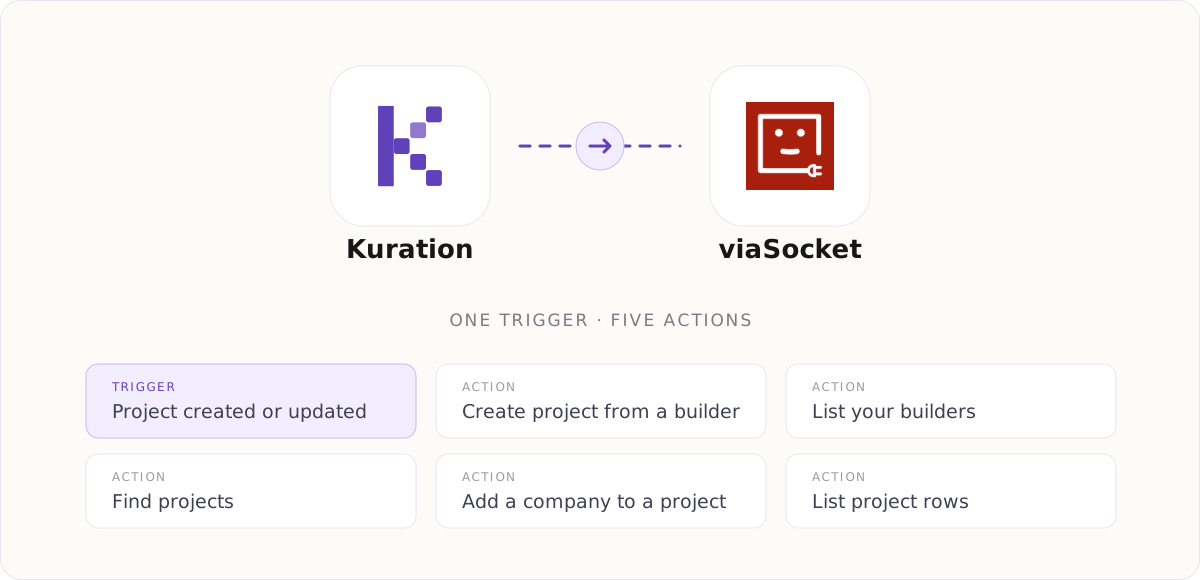
One trigger and five actions are live. The trigger fires when a project is created or updated. The actions create a project from a saved builder, list your builders, find projects, add a company to a project, and list the rows in one. Enrichment still runs inside Kuration; viaSocket covers the handoffs around it.
Handoff One: Getting Data In
The goal here is that nothing waits in an inbox for a human to retype it.
A form submission starts a list
Someone fills in your demo request form, or a contact form, or an event signup. The trigger is the form submission. The action creates a project from a builder you saved earlier, so the research configuration you already trust gets applied automatically. By the time anyone reads the notification, the work has started.
A tag in another tool adds a company
A rep tags an account in the CRM as worth researching. The trigger is the tag. The action adds that company to a standing project you use as a queue. The rep never leaves the CRM, and the queue fills itself.
Both recipes share a property worth noticing: they start work rather than finishing it. That is deliberate. Starting work automatically is low risk, because a human still sees the output before anything is used.
Handoff Two: Getting Results Out
A finished list that nobody has moved is not an asset. This handoff is where most of the delay hides.
A finished list lands in the CRM
The trigger is a project being updated. The action fetches the rows and creates or updates records in your CRM. The important detail is that you map the fields once, carefully, and then never think about it again. Most bad CRM data comes from repeated manual imports with slightly different mappings each time.
Every row appends to an audit log
Push each row to a spreadsheet as it appears. This sounds redundant when the data already lives in two places, and it earns its keep the first time someone asks why a company was contacted. A dated append only log answers that question in seconds. It is also the cheapest way to spot an automation that has quietly started producing nonsense.
Handoff Three: Telling the Team
An alert when a list is ready
The trigger is a project finishing. The action posts to the channel where the person who asked for it actually looks. Include the project name, the row count and a link. Three facts is enough.
Keep this one narrow. An alert on every row turns into noise within a week, and a channel people mute is worse than no alert, because now everyone assumes somebody else is watching.
The Dividing Line: Repetition Versus Judgement
A useful test before you automate anything: given the same input twice, is there exactly one right answer? If yes, automate it. If the right answer depends on context, keep a person in the loop.
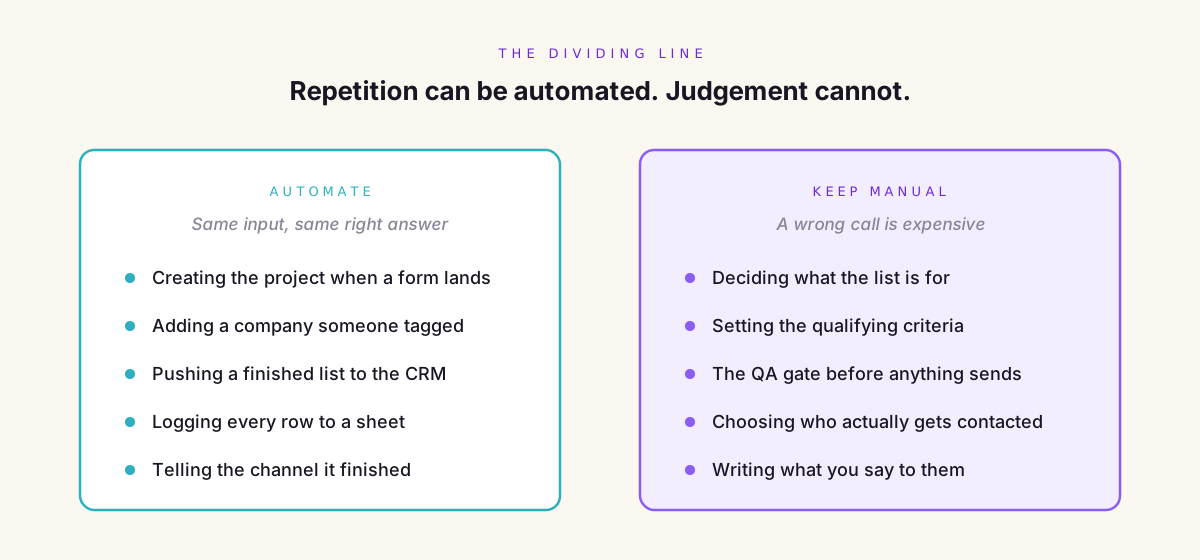
Notice that the manual column is not the hard column. Pushing a list to a CRM is technically fiddlier than deciding who to contact. It is just that getting the push wrong costs you an afternoon, and getting the targeting wrong costs you a domain reputation.
Four Ways an Automated Pipeline Fails Quietly
Automation does not usually break loudly. It drifts, and the failure shows up weeks later in your reply rate.
Silent failure
A step errors at two in the morning and nothing runs for nine days. Nobody notices, because the absence of a Slack message looks identical to a quiet week. Set an alert on failure, not just on success, and check the run history on a fixed day.
Duplicate records
Two triggers fire for the same company and you now have it twice, sometimes with conflicting data. Deduplicate on a stable key such as the domain rather than the company name, and do it before the record reaches the CRM.
Runaway volume
A trigger you thought fired occasionally turns out to fire on every update. You wake up to nine hundred rows and a credit balance you did not plan to spend. Cap the volume on any new automation for its first fortnight and watch what it actually does rather than what you assumed.
Stale mappings
Someone renames a field, and the automation keeps running while writing into the wrong column. This is the one the audit log catches, which is the argument for keeping the log.
Build a QA Gate Into the Flow
The single most valuable thing you can add to an automated pipeline is a deliberate stop before anything leaves the building.
Route finished lists into a review state rather than straight into a sending tool. A person spends five minutes on a sample: are these companies the right shape, do the contacts hold up, is the reason for reaching out still true? Then they release it. Everything before that gate is automated, nothing after it starts without a human.
Teams that skip this gate almost always add it back later, usually after sending something embarrassing to a few hundred people.
A Refresh Cadence That Runs Itself
Scheduled triggers are the least glamorous and most useful automations you will build. A prospect record decays whether or not you are looking at it, so put the checking on a clock.
A monthly schedule that pulls a standing project, re verifies the contactable fields and flags anything that changed will catch most of the drift before it costs you a campaign. It runs whether or not anyone remembers, which is the entire point.
Sequence Your First Three Automations
Do not build ten recipes in an afternoon. Build one, live with it for a week, then add the next. In this order:
- The alert. It is read only, it cannot damage anything, and it teaches you how the triggers behave in practice.
- The inbound capture. Form or CRM tag creates a project. Now new work starts itself.
- The push out. Finished lists reach the CRM. Do this one last, because it is the only one that writes into a system other people depend on.
Building in that order means your first mistake happens somewhere harmless.
What This Setup Cannot Do Yet
Worth being straight about the current limits, because a plan built on capabilities that do not exist is not a plan.
The available actions today cover creating a project from a builder, listing your builders, finding projects, adding a company to a project and listing project rows. That is enough to automate all three handoffs described above.
What it does not yet include is running enrichment itself from outside. You cannot currently trigger a column to run, or score a list against an ICP, from an external automation. The research still starts inside the platform. In practice this matters less than it sounds, because the research is the step you wanted a person on anyway. It is a real limit rather than a fatal one, and it is worth knowing before you design a flow that assumes otherwise.
A Worked Example: From Form to CRM
Putting the pieces together for a team that sells to companies attending industry events.
A visitor submits the demo request form. That fires a trigger, which creates a project from the saved builder configured for event attendees. The company from the form is added as the first row. A message posts to the sales channel saying a new inbound project has started.
Research runs inside the platform, where a person can see it, adjust the criteria and remove the companies that clearly do not fit. When they are happy, they mark the project ready. That mark is the QA gate, and it is a human action on purpose.
Marking it ready updates the project, which fires the second trigger. Rows are fetched, mapped and written to the CRM. Every row also appends to the audit spreadsheet with a timestamp. A second message posts saying the list is live with a row count.
Two automations, one human decision in the middle. The three seams are closed and the judgement is untouched.
How to Tell Whether It Is Working
Measure the gap, not the volume. The number worth watching is the time between a list being finished and the first email going out. Before automation that is usually measured in days, and almost all of it is waiting rather than working.
Two others worth tracking: how many records reach the CRM needing manual correction, which tells you whether your field mapping is right, and how many automation runs failed in the last month, which most people never look at until something has gone wrong for a while.
Common Questions
Do I need to write code to automate a prospecting workflow?
No. Automation platforms connect applications through a visual builder where you pick a trigger, pick an action and map the fields between them. The Kuration integration on viaSocket works this way, so the whole setup is configuration rather than development.
Should I automate the enrichment itself?
Not yet, and arguably not ever in full. Enrichment involves judgement about fit and relevance that is expensive to get wrong. Automate what happens before and after it, and keep a person on the decision in the middle.
How do I stop duplicate companies entering a project?
Deduplicate on the company domain rather than the company name, because names vary in spelling and legal suffix while domains rarely do. Run that check before the record is written, not after, and keep an audit log so you can see when duplicates started appearing.
What happens if an automation fails overnight?
Unless you have configured a failure alert, nothing visible happens, which is the danger. Set alerts on failure as well as success, and review the run history on a fixed day each week so a nine day gap cannot pass unnoticed.
How many automations should I start with?
One. Start with a read only alert, live with it for a week, then add the inbound capture, then the push into your CRM. Building them in that order keeps your first mistake somewhere it cannot damage a system other people rely on.
The Short Version
A prospecting workflow has three seams and one brain. The seams are getting data in, getting results out and telling the team, and all three are repetitive enough to hand to software today. The brain is deciding what the list is for, whether the companies fit and who deserves a message, and that stays with you.
Build the alert first, the capture second and the CRM push last. Put a human gate in front of anything that sends. Then let the boring parts run themselves.