Most B2B sales teams begin prospecting in the same place. They open a commercial database, pick an industry, add an employee range, choose a location, and export a list. It is quick. It is convenient. And it is exactly what many competitors are doing.
Commercial databases are not useless. They are useful for finding companies, identifying contacts, and enriching records. The problem is relying on them as your only source of prospects.
When every company in your market has access to similar databases, similar filters, and similar contact information, your outbound strategy becomes easy to copy. Your team may be working from the same pool of companies as everyone else.
That creates predictable problems. Prospects receive more cold outreach. Decision makers get harder to engage. Response rates fall. Teams compete for attention before they even start a conversation. Differentiation gets harder.
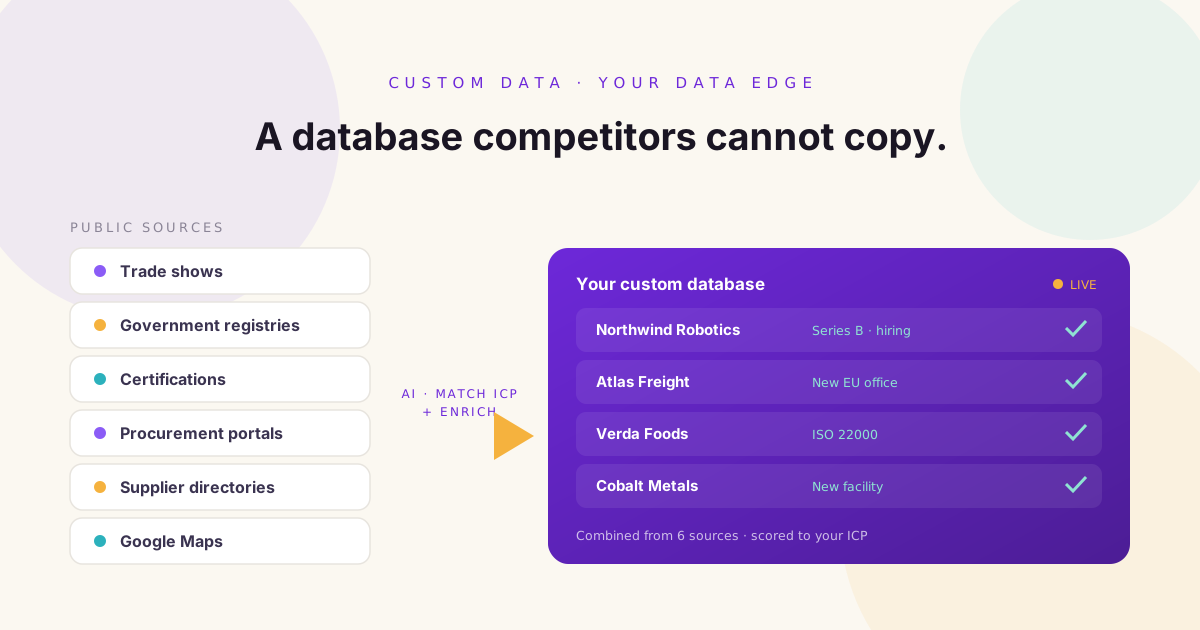
A custom prospect database offers another path. Instead of starting with the companies already sitting in a shared platform, you define the businesses you want to reach and build a database specifically around them. You use your Ideal Customer Profile, unique data sources, and relevant business signals to create a prospecting asset that reflects your strategy, not someone else's database. Here is how to build one.
What Is a Custom Prospect Database?
A custom prospect database is a structured collection of companies and contacts built around your specific targeting criteria. Unlike a generic lead list, it can include information that matters directly to your sales strategy, such as industry, location, company size, revenue, products or services, certifications, trade show participation, expansion activity, hiring trends, funding events, new facilities, government registrations, procurement activity, technology usage, decision makers, and verified contact information.
The key difference is that the database is designed around your ICP. You decide which companies belong, which data sources matter, which signals indicate opportunity, which prospects to prioritise, and which information your team needs before outreach. That makes it more than a list. It becomes a strategic asset.
Why Shared Databases Create a Competitive Problem
Shared databases solve a real problem. They make company and contact information easy to access. But shared access also creates shared competition.
Imagine ten companies selling similar software to mid market manufacturers. All ten use the same database. All ten apply similar filters: manufacturing, 100 to 500 employees, United States, operations leaders. The result is heavy overlap. The same companies receive similar messages from multiple vendors. To the prospect, the outreach blends together. To the sales team, the market feels saturated.
A custom database changes the starting point. Instead of asking 'Which companies are already in our database?', you ask 'Where can we find companies that match our ICP and show evidence of a relevant business need?' That shift uncovers opportunities that broad filters miss.
The Value of Proprietary Prospect Data
Proprietary data is information your company has collected, organised, or combined in a way that is specific to your business. It does not have to be private. Many valuable prospecting sources are public. The advantage comes from how you discover, combine, enrich, and prioritise the information.
For example, a trade show exhibitor list may be public. But your custom database could combine that list with company size, geographic coverage, relevant certifications, recent hiring, new facilities, decision maker information, and your ICP criteria. The final database is far more useful than the original exhibitor list, and much harder for competitors to reproduce because it reflects your strategy.
Step 1: Define Your Ideal Customer Profile
Before collecting data, define the companies you want to find. This is where many teams slip. They start with a large database and try to narrow it later. A stronger approach is to define the target first.
Your ICP may include target industries, geographic markets, employee ranges, revenue ranges, business models, operational traits, technology requirements, growth indicators, relevant certifications, and common customer challenges. For example, a logistics software company might target food and beverage manufacturers in Europe with more than 200 employees, multiple production sites, international distribution, and recent warehouse expansion. That is far more actionable than 'manufacturing companies'. The clearer your ICP, the easier it is to spot useful data sources.
Step 2: Identify Data Sources Competitors Overlook
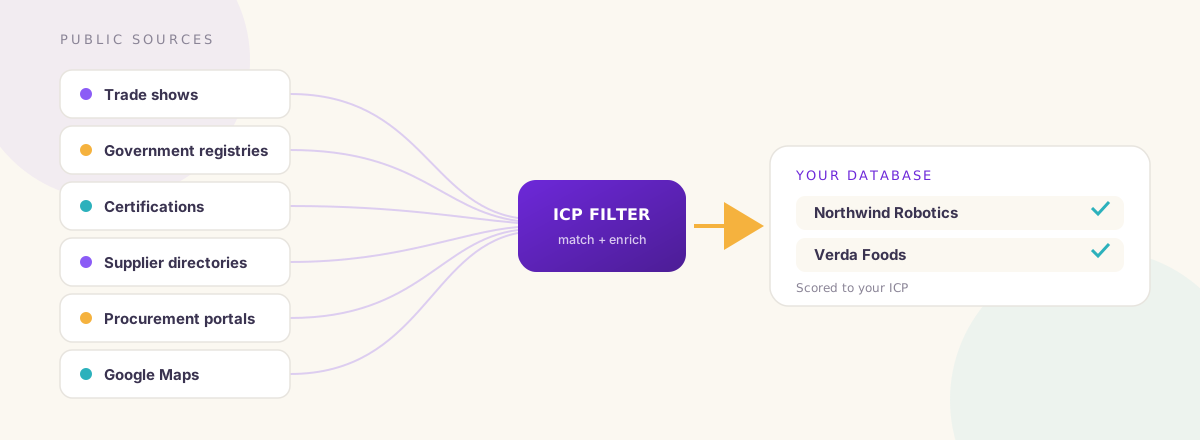
Your best prospects may not sit in one database. They may be spread across hundreds of public and industry specific sources. Depending on your market, useful sources include:
- Trade show exhibitor lists
- Government business registries
- Certification directories
- Industry associations
- Supplier directories
- Procurement portals and public tenders
- Google Maps
- Company websites
- Regulatory databases
- Import and export records
- Franchise directories
- Business licensing records
- Regional business directories
- Conference speaker lists
- Award programmes
- Accelerator and investor portfolios
Every source reveals something different. A trade show list can reveal companies actively investing in visibility. A certification directory can reveal businesses meeting specific quality or regulatory standards. A government registry can reveal newly established entities or expansions. A procurement portal can reveal active purchasing requirements. The goal is not to collect from every source. It is to find the sources most closely connected to your ICP.
Step 3: Look for Business Signals, Not Just Company Filters
Traditional prospecting focuses on what a company is: industry, employee count, revenue, location. Those details are useful, but they do not always show whether a company is changing or investing.
Business signals add context. Examples include raising funding, hiring quickly, opening a new office, entering a new country, building a new facility, exhibiting at a trade show, earning a certification, launching a product, announcing a distribution partnership, or publishing a procurement opportunity. These events can indicate new priorities, new challenges, or new purchasing needs. A company that matches your ICP and shows several relevant signals can be more valuable than a larger company with no signs of activity.
Step 4: Extract and Structure the Data
Raw information is rarely ready for outreach. You may find company names in PDFs, websites, online directories, event pages, public records, spreadsheets, and search results. The information then needs to be organised into a consistent format.
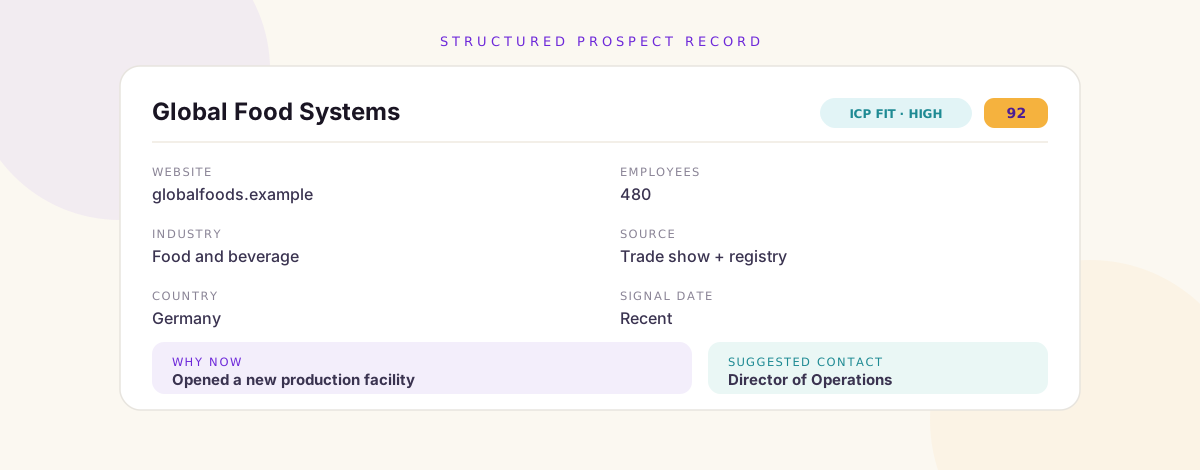
A useful database includes fields such as company name, website, industry, country, employee range, a business signal, the signal date, the data source, an ICP score, and a decision maker. Consistency matters. If one source lists 'Food Manufacturing' and another lists 'Food and Beverage', your database should use a standard classification where it makes sense. Without structure, even a large pile of data is hard to use.
Step 5: Enrich Company Records
Finding a company is only the beginning. Your team still needs enough context to understand what the company does, how large it is, where it operates, who makes relevant decisions, and why it may be worth contacting.
Enrichment adds that missing context. Depending on your workflow, it may include company descriptions, employee estimates, revenue estimates, office locations, technology information, relevant job openings, decision maker names, job titles, business email addresses, and professional profiles. Enrichment turns a company name into a usable sales opportunity.
Step 6: Add the Why Now
One of the most valuable fields in a custom database is the reason a company is relevant now. This is the difference between a static list and a signal driven prospecting system.
For example: Global Food Systems, high ICP fit, recently opened a new production facility, signal date recent, likely need warehouse automation and operational software, suggested contact Director of Operations. Now the rep has a reason to research the company and a possible angle for outreach. The goal is not to assume every signal means the company is ready to buy. It is to provide useful context for prioritisation and research.
Step 7: Score and Prioritise Prospects
Not every company should receive the same attention. A simple scoring system helps your team prioritise. You might add points for a strong ICP fit, a relevant growth signal, recent business activity, the right company size, and a relevant decision maker identified.
A company with a high score may be ready for immediate outreach. A moderate score may fit a nurture campaign. A low score may need more research or be excluded. The exact model should reflect your business. There is no universal formula.
Step 8: Segment the Database for Better Campaigns
One large database can be hard to use. Segmentation makes outreach more relevant. You might segment by industry, country, company size, growth stage, certification, business signal, use case, or product relevance.
For example: manufacturers opening new facilities, companies entering international markets, recently certified food producers, and trade show exhibitors seeking distributors. Each group has a different business context, which makes it easier to build relevant campaigns without pretending every prospect has the same challenge.
Step 9: Keep the Database Current
A prospect database is not a one time project. Businesses change. People move roles. Companies expand. New signals appear. Old information loses value.
A strong data process includes regular updates. You might monitor new business registrations, new certifications, recent hiring, trade show participation, funding announcements, expansion activity, and changes in company information. The goal is a living prospecting asset, not a spreadsheet that goes stale after a few months.
How AI Helps Build Custom Prospect Databases
Building a custom database by hand takes real time. Teams can spend hours searching websites, copying information, cleaning spreadsheets, and identifying decision makers. AI reduces much of that repetitive work. Depending on the tools and workflow, AI can help:
- Search multiple public sources
- Extract company information
- Identify relevant business characteristics
- Standardise data
- Remove duplicates
- Categorise companies
- Detect business signals
- Enrich company records
- Prioritise prospects
- Keep databases updated
The value is not only speed. AI makes it practical to analyse sources that would be too time consuming to process by hand. That lets teams explore more specialised markets and build more precise prospect databases.
A Practical Example
Imagine a company selling supply chain software. A generic database search might return 20,000 manufacturing companies in Europe. That is a large audience, but not a useful prospect list.
A custom database could focus on companies that manufacture food and beverages, operate more than one production site, export internationally, hold relevant food safety certifications, recently expanded warehouse capacity, and are hiring supply chain leaders. The final list is much smaller, but far more relevant. The team can prioritise companies based on real business context rather than broad demographic filters.
Common Mistakes When Building a Custom Database
- Starting with data instead of the ICP. Collecting information without clear targeting creates unnecessary work. Define the desired customer first.
- Using too many sources. More sources do not automatically create better data. Prioritise the ones that reveal meaningful information about your ICP.
- Collecting data without a use case. Every field should have a purpose. If you cannot say how sales will use it, it may not be needed.
- Ignoring data quality. Incomplete or outdated information reduces value. Use validation, standardisation, and regular updates.
- Treating every signal as intent. A signal can indicate relevance, but it does not guarantee a purchase. Use signals to prioritise research.
- Building the database once. The market changes continuously. Your database should evolve with it.
Frequently Asked Questions
What is a custom prospect database?
A custom prospect database is a collection of companies and contacts built around a specific Ideal Customer Profile, relevant data sources, and business signals.
How is a custom database different from a standard lead list?
A standard lead list is usually built from broad, shared filters. A custom database is designed around your specific market, targeting strategy, and sales use cases.
Where can I find unique B2B prospect data?
Useful sources include trade shows, government registries, certification directories, procurement portals, industry associations, supplier directories, public records, and company websites.
Why is proprietary prospect data valuable?
It helps your business discover opportunities that are not limited to the same shared filters and databases your competitors use.
Can AI build a custom prospect database?
AI can help discover, extract, organise, enrich, categorise, and prioritise data. A clear ICP and human review remain important to keep the database aligned with your goals.
How often should a prospect database be updated?
It depends on the market and the source. High change signals may need frequent monitoring, while more stable company information can be reviewed periodically.
Build a Prospect Database That Reflects Your Strategy
The strongest prospect databases are not necessarily the largest. They are the most relevant. They are built around a clear ICP, supported by meaningful signals, enriched with useful context, and maintained as the market changes.
Shared databases can still play a role. They just do not have to define your entire strategy. By combining unique data sources with AI research and enrichment, your team can build a database that reflects how your ideal customers actually operate, and where new opportunities are emerging. That is harder to copy than a standard set of filters, and it gives your team a stronger place to start.
Stop relying only on the same prospect lists as everyone else. Build a data advantage designed around your market.